Both a web proxy and a VPN can open YouTube when a network blocks it. Which one is right depends on what you want to watch and on which device.
The short answer: a web proxy needs no install and works inside one browser tab. A VPN is an app that routes every app on your device, including the YouTube app. If you need a regular video in a browser where you cannot install anything, try the proxy. If you use the YouTube app, mostly watch Shorts, or watch every day on your own device, a VPN fits better.
AnyProxy publishes this page and sells a web proxy, so weigh our view accordingly. We tested the proxy side; we did not test any VPN.
What each tool actually does for YouTube
A web proxy
You open anyproxy.site in your browser, type youtube.com, pick a region, and YouTube loads in the same tab. Our server fetches the pages from its region and passes them back. The network in front of you sees an encrypted connection to AnyProxy, not to YouTube. AnyProxy opens a site from its home page, so a pasted video link lands on YouTube’s home page; search for the video from there.
What played, 15 October 2026. A regular video (“Me at the zoo”) played to the end through Singapore, with the player clock at 0:19 of 0:19. Through Frankfurt one run played and one stayed at 0:00 behind YouTube’s EU “Before you continue” cookie screen, which appears because YouTube sees a German address. Search worked, including in Thai.
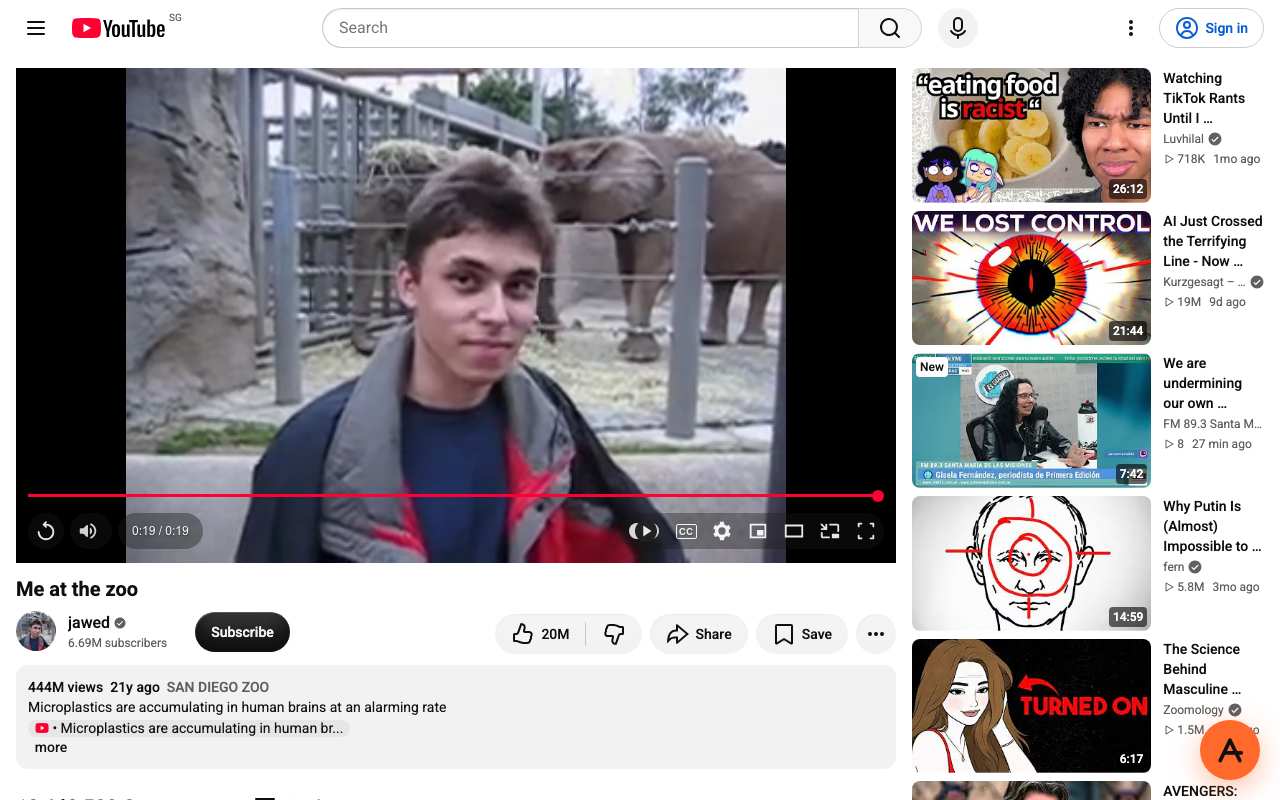
Caption: A regular YouTube video played to the end through AnyProxy, Singapore region, 15 October 2026.
What did not. A YouTube Short loaded its page, likes and comments, but the player stayed black. We did not test signing in, and we have not measured resolution: the test clip is a 2005 upload, so it says nothing about HD. The YouTube mobile app cannot use a web proxy at all, because a proxy is a website; on a phone, open YouTube in Chrome or Safari.
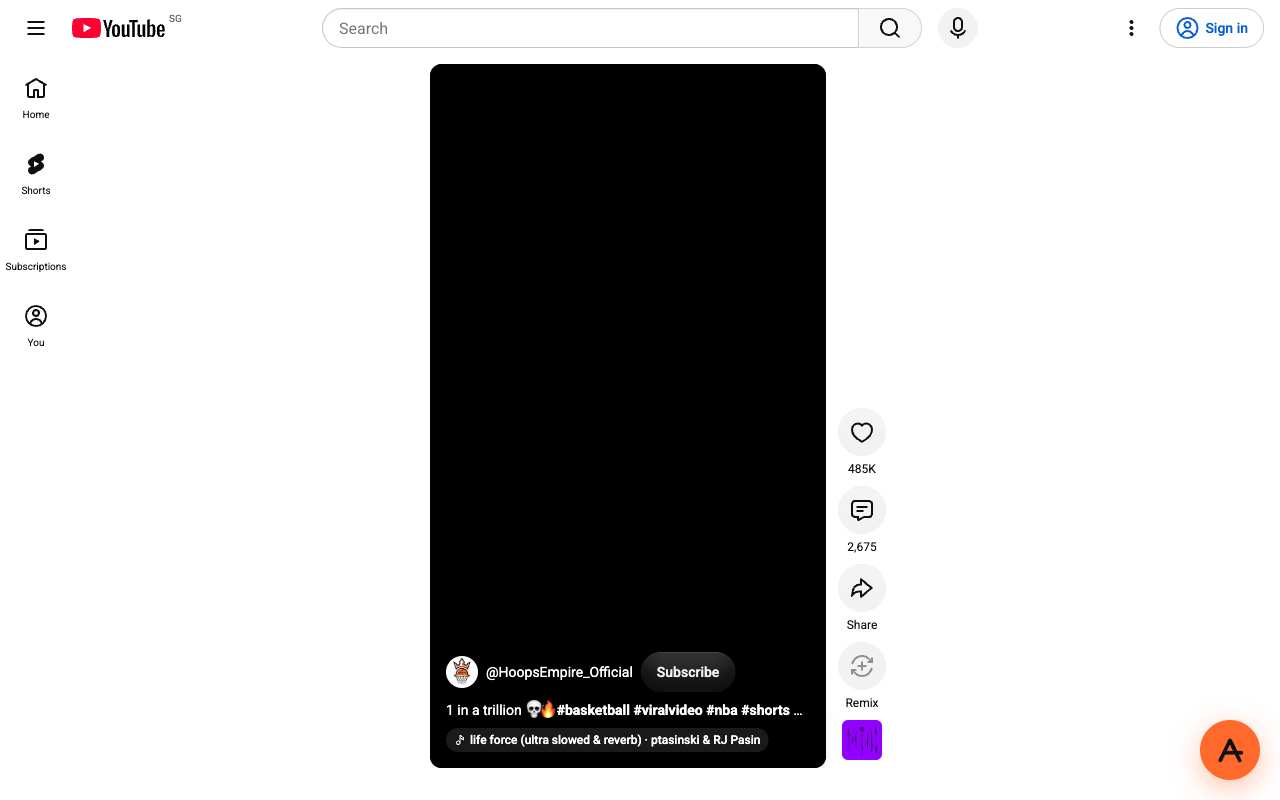
Caption: A YouTube Short through AnyProxy Singapore, 15 October 2026: the page loaded, the player stayed black.
A VPN
You install a VPN app on your device. When the app is running, every request from every app, including the browser, the YouTube app and background sync, goes through an encrypted tunnel to a VPN server. Sites see the VPN server’s address, not yours.
What plays. The YouTube app works because the VPN routes app traffic too. A VPN does not rewrite pages, so features such as Shorts behave as they do on a direct connection; speed depends on the VPN server’s distance and load.
What does not. VPNs need to be installed, which managed Chromebooks and work laptops often prevent. Some networks also block VPN protocols.
Head-to-head comparison
| Web proxy (AnyProxy) | VPN | |
|---|---|---|
| Install anything | No, it is a website | Yes, an app or system profile |
| Managed Chromebook or work laptop | Runs in a tab, unless the admin blocks the proxy’s site | Often blocked from installing |
| Regular videos (15 Oct 2026) | Played via Singapore; Frankfurt showed an EU consent screen | Not tested by us |
| YouTube Shorts (15 Oct 2026) | Player stayed black | Not tested by us; no page rewriting involved |
| YouTube mobile app | No, browser tabs only | Yes |
| Country YouTube sees | The proxy server’s (Singapore, Germany or US on the free tier) | The VPN server’s |
| Cost | Free tier; Pro $4.99 a month or $39 a year | Usually a paid subscription |
| Whole-device coverage | No, one tab | Yes |
| Trust | The operator handles your traffic | The operator handles your traffic |
When the proxy is the right call
- You are on a device where you cannot install apps and only need YouTube in a browser tab.
- You want a specific regular video, not a Shorts feed.
- You are on someone else’s computer (library, friend’s laptop, hotel PC) and do not want to leave software behind. Proxied addresses still go into that browser’s history, so use a private window.
- You want to try something free before committing to a paid tool.
When the VPN is worth it
- YouTube on your phone or TV through the app.
- You mainly watch Shorts.
- You watch YouTube on this device every day and want a one-time setup.
- You need other apps on the device routed too: messaging, gaming, work tools.
The gray zones
Paid streaming services are the honest edge case. Netflix, Disney+ and Prime Video need an account and apply licence and region checks, and they are not supported through AnyProxy. That is not DRM itself refusing proxies: a Widevine-protected test video from Google’s Shaka Player demo played through AnyProxy on 15 October 2026. A VPN can sometimes reach these services, though they block addresses they recognise as VPN servers.
Signing in. We did not test it. Anything you type, including a password, passes through the proxy operator, and AnyProxy is not a no-logs service, as its privacy policy explains. If you do sign in, use two-factor authentication and sign out afterwards.
The honest recommendation
Try the proxy first if you only need a regular video in a browser. It is free and needs nothing installed; if it plays the video, you are done. If you need Shorts, the app, or daily viewing on your own device, a VPN’s setup time earns its keep. Either way, if the network belongs to a school or employer, its rules on YouTube and on proxies apply to you.
Ready to test? Open YouTube through AnyProxy: no install, no signup, three free regions.