Unblock X.
From anywhere.
Free X proxy. No install. Works on a Chromebook, a phone, and any managed browser.
Verified · 2026-10-15
X is blocked outright in China, Iran, Russia, North Korea, Myanmar and Turkmenistan, and Tanzania has blocked it since 20 May 2025. Two more countries blocked it recently and then backed down: Pakistan for 15 months (February 2024 to May 2025) and Brazil for about five weeks in 2024.
Source: verification.
What we tested through AnyProxy
What works on X, and what doesn't
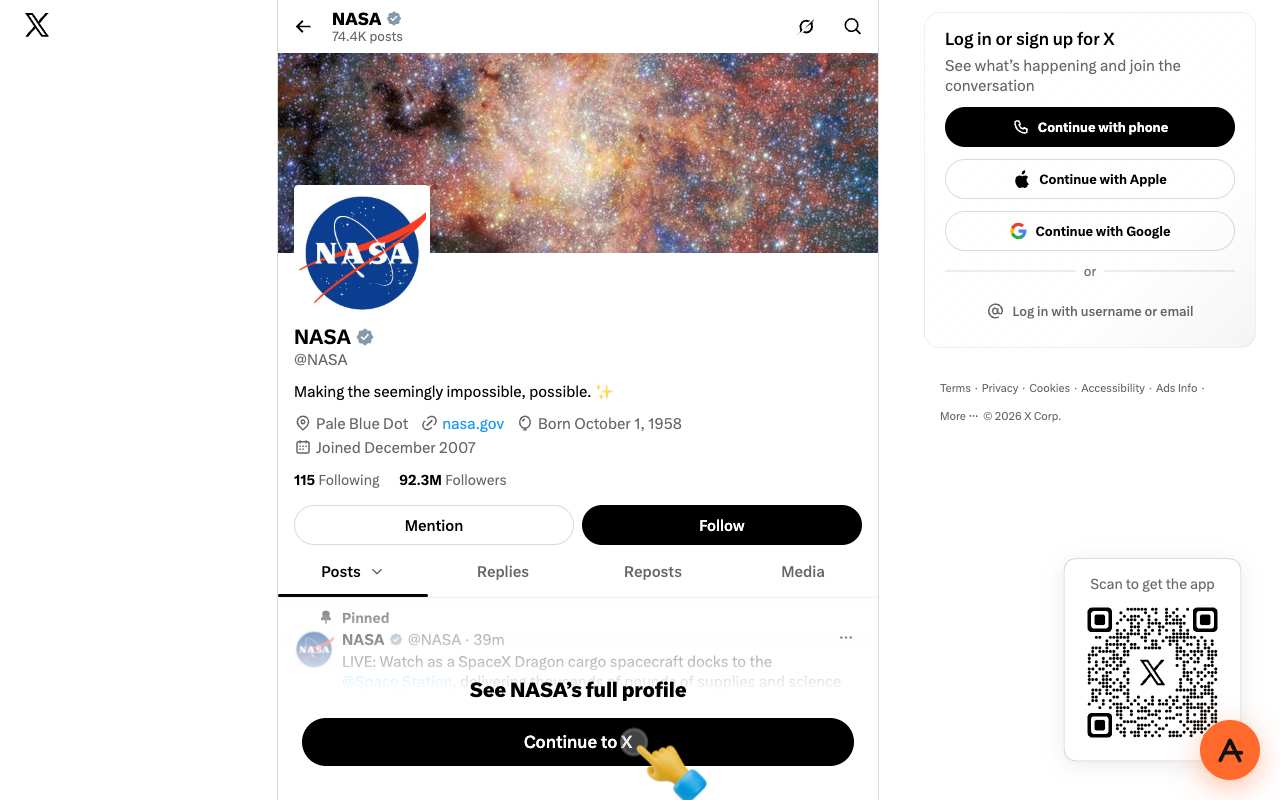
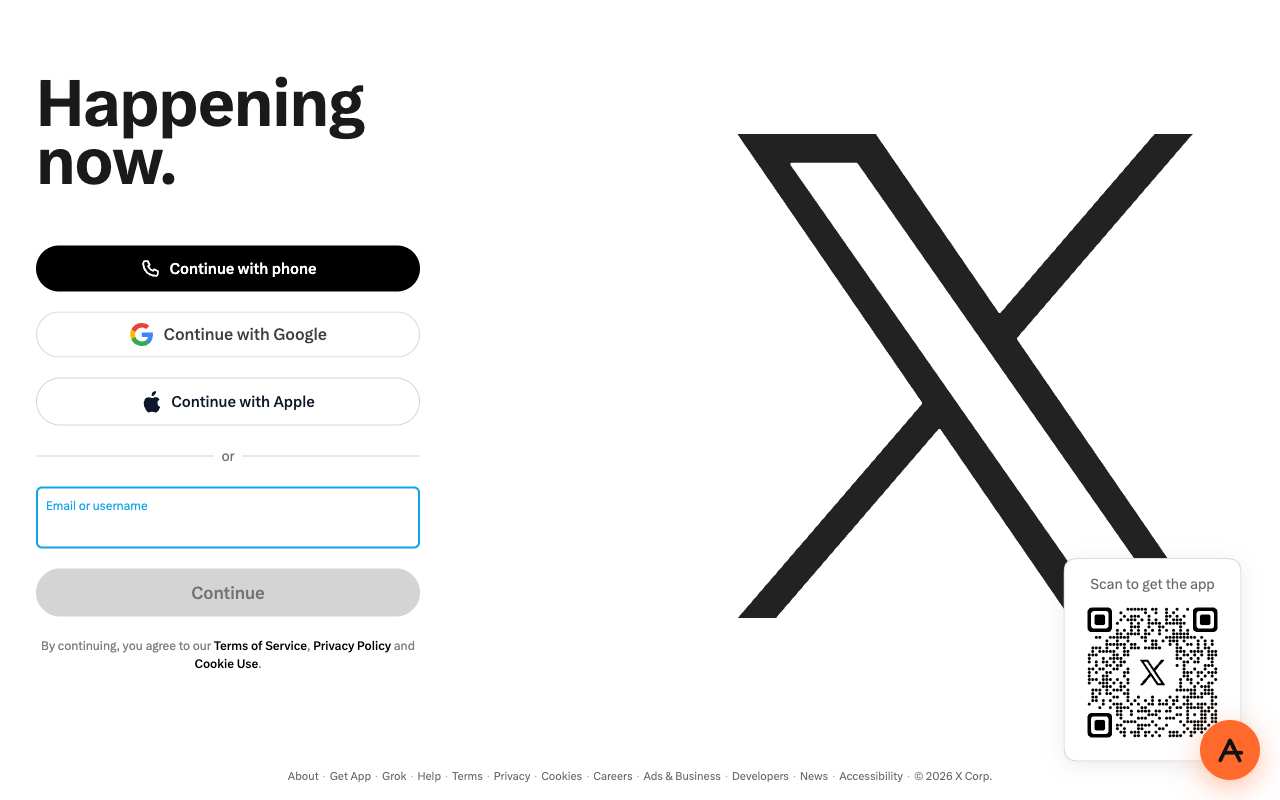

Tested from our proxy exits with a fresh browser, no account. Results can change when X changes.
What is a X proxy?
The short answer
A X proxy is a server that fetches X for you and returns the page through your browser. Instead of your device asking x.com directly, your browser asks anyproxy.site, and we ask X on your behalf. The site sees our server, not you. Your network sees anyproxy.site, not X.
That single hop is what lets a blocked X page open. No app to install, no account to make. Six regions, sorted by real latency.
X infrastructure, verified
X itself is healthy
When X will not load, X's own servers are rarely the cause. Here is a dated snapshot of the real x.com infrastructure from DomainScan on 2026-10-05 — compare against your network's symptoms.
11 of 15 public DNS resolvers returned an address for x.com in this snapshot. A resolver with no answer is not proof of blocking anywhere. If your own network returns nothing or a different address, the problem is more likely on your network than at X.
Where X is blocked
X block map, with mechanism
The countries that actively block X, how they do it, and when. Rows link to their source where we have one; rows without a link are not independently verified.
From your country
Where X is restricted
How to unblock X
Three steps, no account
Type x.com
It is already in the box above. AnyProxy opens the site's home page; go deeper from there.
Pick your region
We start you on the nearest server. A closer region means smoother loading.
Browse
X opens in this tab. The tests on this page show which features worked for us.
X — the timeline
Dated events in X's censorship history
- Mar 2006Twitter founded by Jack Dorsey, Biz Stone, Evan Williams and Noah Glass.
- Jun 2009China blocks Twitter ahead of the Tiananmen anniversary; the same year Iran blocks it during election protests. source
- Mar 2014Turkey blocks Twitter for about two weeks before local elections. source
- Apr 2016North Korea formally bans Twitter. source
- Feb 2021Myanmar's military blocks Twitter after the coup. source
- Mar 2021Russia begins throttling Twitter over "illegal content". source
- Jun 2021Nigeria suspends Twitter; the suspension is lifted in January 2022. source
- Mar 2022Russia blocks Twitter outright after invading Ukraine. source
- Oct 2022Elon Musk completes the $44 billion acquisition of Twitter.
- Jul 2023Twitter rebrands as X; x.com becomes the primary domain.
- Feb 2024Pakistan blocks X after its general election; access returns in May 2025. source
- Aug 2024Justice Alexandre de Moraes orders the immediate nationwide suspension of X in Brazil on 30 Aug; access returns in October 2024. source
- May 2025Tanzania blocks X from 20 May after the police account is hacked; OONI finds IP blocking of x.com and twitter.com. source
- Sep 2025Nepal blocks X and 25 other platforms on 4 Sep and lifts the ban on 9 Sep after deadly protests. source
What the proxy cannot do for X
Honest caveats
- The X mobile app is not proxied — open x.com in Chrome or Safari instead.
- X often asks for extra login verification (email or phone code) when you sign in from a new country. Sign in from your usual connection first if you can.
- Logged out, X shows only a profile's header and pinned post, then asks you to continue to X. Our 15 Oct 2026 results were mixed: in a regular Chrome window NASA's profile partly loaded in Singapore and the sign-in page loaded in Virginia, automated browser runs got a blank page, and Frankfurt showed X's 'Something went wrong!' error. If you see a blank page or that error, try Singapore.
- Spaces (live audio) and video calls in DMs use WebRTC and may not work through a browser proxy. We have not tested posting, DMs or video playback; they need a login.
- In countries where X is blocked, using circumvention tools may carry legal risk. This page describes how the technology works; following local law is your responsibility.
Need every app on your device covered, not just one browser tab? That is a VPN's job — see proxy vs VPN for when each is the right tool.
FAQ
X, specifically
On managed networks
Open X on managed devices
Managed networks — managed Wi-Fi, café PCs, hostel internet — often filter X at the DNS or IP level. Content filters used by schools and companies sort sites into categories such as "social", and administrators choose which categories to block.
Because AnyProxy is a website — not an app or extension — a Chromebook or managed browser that restricts installs still opens it in Chrome. Type x.com and X opens in the same tab, as far as the site allows it; see the tests above. Note: your organisation's acceptable-use policy still applies; check it before use.
Related
Unblock these too
By country
Country-specific evidence
Historical reports describe particular dates and networks. They are not live availability tests. Country context does not select an exit server.
IndiaResearch notes
Feb 2021–Feb 2022: Government issues Section 69A orders covering 1,474 accounts and 175 tweets, later challenged by X (then Twitter). 30 Jun 2023: Karnataka High Court (Justice Krishna S. Dixit) dismisses Twitter's challenge and imposes ₹50 lakh costs. Aug 2023: X files appeal before a division bench; it remains undecided. May 2025: X says India ordered it to block over 8,000 accounts, including news organisations, and that it is withholding them in India only. 24 Sep 2025: Karnataka High Court dismisses X's separate challenge to the Sahyog takedown portal (Section 79(3)(b)). 14 Nov 2025: X appeals the Sahyog ruling. Jul–Oct 2026: OONI: 28,663 of 29,232 tests of twitter.com from India load normally.
Under Section 69A of the IT Act the government sends X confidential blocking orders naming accounts or posts. X does not remove them globally; it 'withholds' them for viewers it locates in India, so the block is applied by X based on your location, not by your ISP. A separate route, the Sahyog portal, sends takedown notices under Section 79(3)(b). Network-level blocking of the whole site is not visible in OONI data.
Networks
- Reliance Jio: AS55836. 9,321 tests of twitter.com, 9,236 normal, 0 confirmed
- Bharti Airtel broadband: AS24560. 7,744 tests, 7,717 normal, 0 confirmed
- ACT Fibernet: AS24309. 2,450 tests, 2,442 normal
- Airtel mobile: AS45609. 1,966 tests, 1,948 normal
- BSNL: AS9829. 1,024 tests, 1,003 normal
- DigitalOcean (cloud, not an ISP): AS14061. All 45 confirmed twitter.com blocks in the window (of 472 tests) came from this network
What works
In our automated tests through AnyProxy on 15 October 2026, X profile pages stayed blank in Singapore and Virginia, and Frankfurt showed an error. In a separate run the same afternoon, a regular Chrome window via Singapore partly loaded a profile and the Virginia sign-in page worked (see the X page). Expect X to be unreliable through a web proxy, especially without an account.
- X did not render through AnyProxy on 15 Oct 2026 in any of three tries (Singapore, Virginia, Frankfurt headed).
- Accounts withheld in India are hidden by X based on where it thinks you are; on a normal Indian connection the rest of X works without a proxy.
- Logged-out X visitors see limited content even when X loads normally.
Timeline
- Feb 2021–Feb 2022Government issues Section 69A orders covering 1,474 accounts and 175 tweets, later challenged by X (then Twitter). Source
- 30 Jun 2023Karnataka High Court (Justice Krishna S. Dixit) dismisses Twitter's challenge and imposes ₹50 lakh costs. Source
- Aug 2023X files appeal before a division bench; it remains undecided. Source
- May 2025X says India ordered it to block over 8,000 accounts, including news organisations, and that it is withholding them in India only. Source
- 24 Sep 2025Karnataka High Court dismisses X's separate challenge to the Sahyog takedown portal (Section 79(3)(b)). Source
- 14 Nov 2025X appeals the Sahyog ruling. Source
- Jul–Oct 2026OONI: 28,663 of 29,232 tests of twitter.com from India load normally. Source
Is X (Twitter) banned in India?
No. OONI tests between July and October 2026 show X loading normally on Jio, Airtel, ACT and BSNL. India blocks specific accounts and posts, which X withholds in India.
Why do some X accounts say 'withheld in India'?
The government sends X blocking orders under Section 69A of the IT Act. X withholds those accounts or posts for viewers in India. In May 2025 X said it had been ordered to block over 8,000 accounts.
What happened in X's case in the Karnataka High Court?
On 30 June 2023 the court dismissed X's challenge to blocking orders covering 1,474 accounts and 175 tweets, and imposed ₹50 lakh costs. X appealed in August 2023; the appeal is pending. A separate challenge to the Sahyog portal was dismissed on 24 September 2025 and appealed on 14 November 2025.
Does X work through AnyProxy?
Only partly. On 15 October 2026 profile pages stayed blank in our automated tests and partly loaded in a regular Chrome window via Singapore. Logged-out X shows limited content even directly.
Research updated . Availability may have changed.
IndonesiaOpen
Open nationally; Kominfo filters adult content and managed networks filter social media
PakistanHistorical · Feb 2024 → May 2025
PTA block imposed after the February 2024 general election, citing national security and non-registration under local rules Source
TurkeyRestricted · occasional
BTK blocks and bandwidth throttling during political events and disasters Source
IranBlocked · 2009
Blocked after the 2009 election protests; kept blocked in the Dec 2024 SCC review Source
ChinaBlocked · Jun 2009
Great Firewall: DNS poisoning, IP blocks and SNI filtering on x.com / twitter.com Source
RussiaBlocked · Mar 2022
Roskomnadzor throttled Twitter from Mar 2021, then blocked it after the Ukraine invasion Source
BrazilHistorical · Aug 2024 → Oct 2024
Supreme Court Justice Alexandre de Moraes ordered an immediate nationwide suspension on 30 Aug 2024 after X refused to name a legal representative; lifted once X complied and paid fines Source
NigeriaHistorical · Jun 2021 → Jan 2022
Federal government suspension after a presidential tweet was removed; lifted after seven months Source