A proxy server is a computer that fetches web pages on your behalf and returns them to your browser. Your device asks the proxy, the proxy asks the destination site, and the page comes back through the proxy. The destination sees the proxy’s address, not yours, for the traffic the proxy carries.
That single sentence is the whole idea. Everything else is nuance — where the proxy sits, what it filters, and what it decides to show you back.
Two kinds worth knowing
There are dozens of proxy variants in enterprise networking, but for anyone reading this page the two that matter are:
- A forward proxy sits between your device and the internet. Your browser asks it for pages instead of the destination site. This is what a web proxy like AnyProxy is — you use it to reach a site your local network won’t fetch for you directly.
- A reverse proxy sits between the internet and a website. Visitors ask the reverse proxy, and it decides which internal server actually serves the page. Cloudflare, Nginx and Varnish are common reverse proxies. You never “use” one on purpose — you talk to one every time you open a big site.
For the rest of this piece we mean the forward kind, unless we say otherwise.
How a web proxy actually works
- You open anyproxy.site and type a site’s address. (Only the site itself is accepted: a pasted deep link opens that site’s home page, and you navigate from there.)
- Our server receives the request over HTTPS and looks up the destination site.
- Our server fetches the page, streams it back to your browser, and rewrites the page’s links so subsequent clicks route through us too.
- Your browser renders it. As far as your local network can see, you are talking to anyproxy.site — nothing else.
When a proxy is the right tool
Pick a web proxy when:
- You need to open one site right now, on a locked network, from a device you can’t install anything on.
- You want to try a page from a different country’s routing without changing your whole device’s network settings.
Pick a VPN when you want every app on your device on a different network at once — for privacy on public Wi-Fi, for apps outside the browser, or for traffic a web proxy does not carry, such as WebRTC video calls.
Do proxies hide your IP?
For normal page traffic, the destination site sees the proxy’s IP, not yours. On 15 October 2026 we opened httpbin.org/headers, which echoes the headers a site receives, through AnyProxy’s Singapore server: it got the browser’s own user agent and language settings, but no X-Forwarded-For or Forwarded header carrying the visitor’s address.
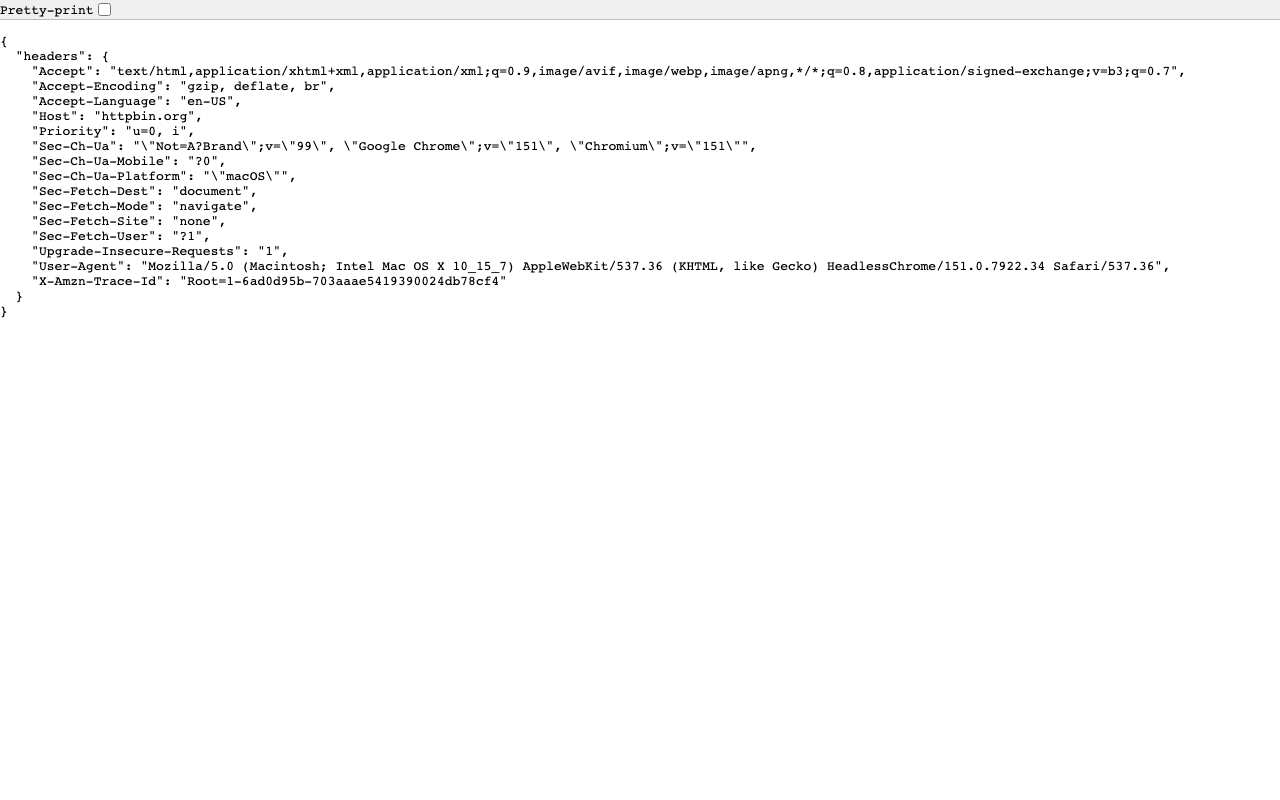
Caption: httpbin.org/headers through AnyProxy Singapore, 15 October 2026.
There are limits. Browser features such as WebRTC, used for video calls, can reveal your real IP to a page you open through a web proxy, because the proxy does not carry that traffic. Your local network still sees you connecting to the proxy over an encrypted link — it just cannot see which sites you are opening through it. The proxy operator can see both. And if you sign in to a site while proxied, the site knows it is you the moment you log in; the proxy only hides your address, not your identity.
Is a proxy the same as a VPN?
No. A VPN is an app that runs on your operating system and wraps every request from every program in an encrypted tunnel. A proxy is a server that fetches individual pages. Both can move where a network request appears to come from; only a VPN protects your whole device.
The short version: a proxy is a tab, a VPN is a device.
Try it
If you have a site you can’t open, paste its address into anyproxy.site and we will fetch it for you. Three free regions (Singapore, Frankfurt, Virginia; Tokyo and Los Angeles on Pro), no install, no signup.