Every web request has three points that can watch it: your local network, the proxy in the middle, and the destination site. A web proxy changes what each one sees. Below is the honest, per-hop map.
Without a proxy
| Who can see | Your IP | The URL you asked for | The page contents |
|---|---|---|---|
| Your local network / ISP | Yes | Yes (the domain, at least) | Only if not HTTPS |
| The destination site | Yes | Yes | Yes — it served it |
Even with HTTPS, your ISP sees which domain you connected to (through DNS and TLS SNI), just not the page inside the connection.
With a web proxy
| Who can see | Your IP | The URL you asked for | The page contents |
|---|---|---|---|
| Your local network / ISP | Yes — but only that you’re talking to the proxy | Only that the proxy’s domain was called | No |
| The proxy | Yes — because you connected to it | Yes — that’s how it fetches for you | Yes — it forwards the page to you |
| The destination site | Usually not — it sees the proxy’s IP, unless WebRTC leaks yours (below) | Yes — it’s still serving that page | Yes |
What the proxy can see
A web proxy is not magic. Because it fetches on your behalf, it sees:
- Your IP address (that is how it sends the page back).
- Every URL you ask it to fetch.
- The page contents on the way through. HTTPS protects the leg from your browser to the proxy, and for HTTPS sites there is a separate encrypted leg from the proxy to the site, but the proxy itself handles the decrypted page between those two legs. For a plain HTTP site, the second leg is not encrypted at all.
Whether it stores any of that is a policy choice by the proxy operator. AnyProxy’s privacy page says the service can record destination URLs or hosts, browse and session identifiers, region, country, browser details, referrer and a hashed IP address; it does not claim to be a no-logs service, and it does not promise automatic deletion of all operational records after a fixed period. Different proxies make different choices — ask the one you use.
What signing in changes
If you sign in to Google, YouTube, X, Instagram or anywhere else while on a proxy, that site now knows it is you. The proxy hid your IP from them, but you handed them your identity in the sign-in form.
If you use the proxy only for reading — not signed into anything — the destination site sees requests from the proxy’s IP. That is not the same as anonymous: cookies the site sets during the proxied session, and your browser fingerprint, can still let it recognise a returning visitor.
What a proxy does not hide
- The pages you visit from the proxy operator. They have to know, that is how the proxy works.
- Your account activity on sites you sign in to. The site sees you the moment you log in.
- Your real IP from WebRTC. WebRTC, the browser technology behind video calls, can be triggered by a page’s script without any prompt, and it asks servers on the internet for your connection’s public address. A web proxy relays web pages; it does not carry WebRTC traffic. On 15 October 2026 we opened browserleaks.com/webrtc through AnyProxy’s Singapore server: the page’s normal IP rows showed the Singapore exit, but its WebRTC section listed the test machine’s own public addresses. ipleak.net through Frankfurt showed the same. To close this, disable or restrict WebRTC in your browser settings or with a trusted extension, or use a VPN that covers the whole device.
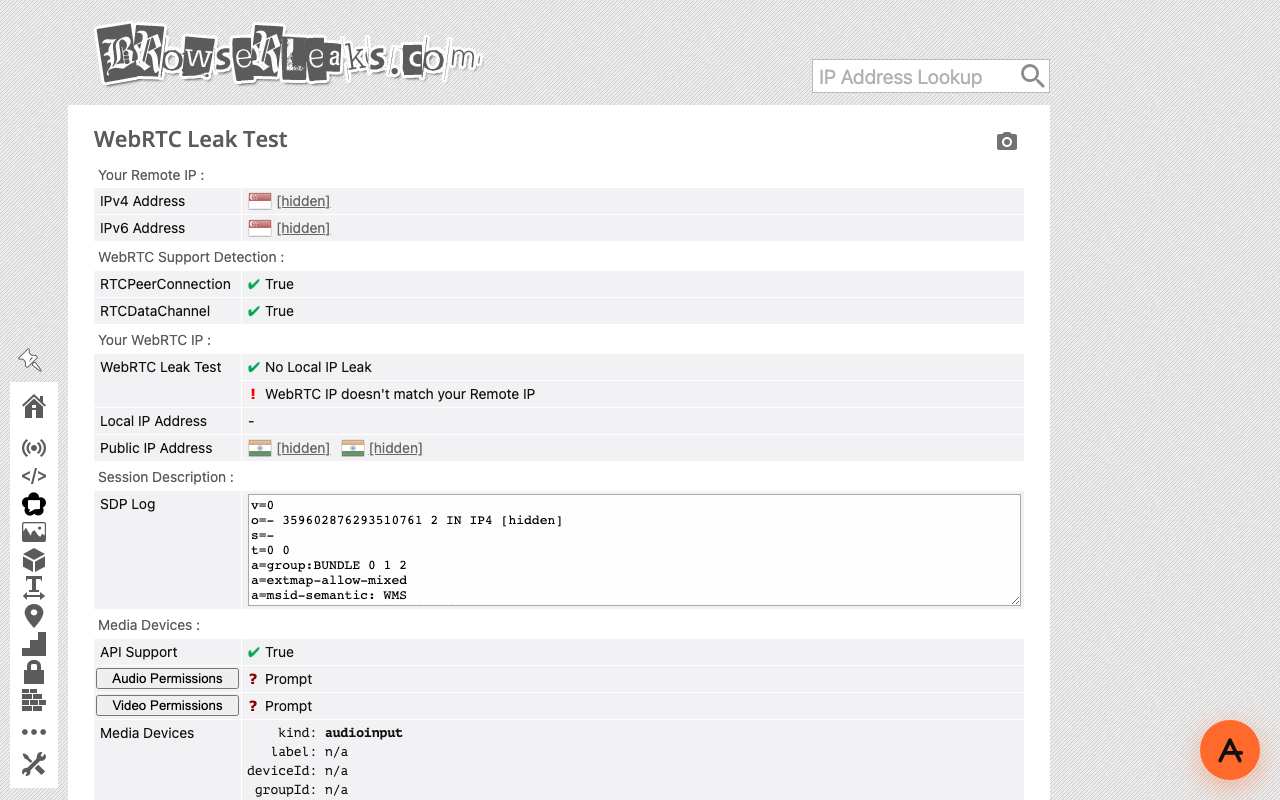
Caption: browserleaks.com/webrtc through AnyProxy Singapore, 15 October 2026. “WebRTC IP doesn’t match your Remote IP”: the page saw the proxy, WebRTC saw the test machine. Addresses redacted.
- Browser fingerprint. Your screen size, installed fonts, timezone and similar details are read by scripts running in your own browser, so the destination can still see them. A proxy does not change these.
- Cookies set while you browse through the proxy. Your browser’s existing cookies for a site are normally not sent through a web proxy, because the page lives under the proxy’s address. But cookies the site sets during the proxied session can let it recognise you on later visits through the same proxy.
When you want stronger privacy
A web proxy is the right tool for opening a blocked page. It is not the right tool for hiding your identity from a site you sign in to, or from your ISP across every app.
For device-wide privacy, use a VPN — see our proxy vs VPN piece. For anonymity from the destination site itself, use a browser (like Tor Browser) that fights fingerprinting alongside routing.
The short answer
A proxy hides the destination from your local network, and hides your IP from the destination for normal page traffic — until you sign in, and not from WebRTC. It does not hide anything from the proxy itself. Pick a proxy whose logging policy you trust.