A VPN kill switch is a feature that cuts your device off from the internet the moment your VPN connection drops. If the tunnel disappears — because the app crashed, the server rebooted, or your Wi-Fi hiccupped — a kill switch blocks every app from reaching the network until the tunnel is back.
Without a kill switch, when the VPN drops your traffic can silently fall back to your real connection. Sites you were opening see your ISP address, not the VPN’s, until the tunnel is back.
The two common kinds
Not every “kill switch” toggle in a VPN app is the same thing. There are two implementations, and it matters which one your app uses.
System-wide kill switch
Blocks all internet traffic from every application until the tunnel is back. Turn on the VPN — everything works. VPN drops — nothing works, everywhere on the device, until the tunnel reconnects.
This is the safer default. If you are relying on the VPN to hide anything, this is the setting that means what it says.
App-level kill switch
Blocks specific apps you nominate. Your browser stops sending traffic when the VPN drops; your background music keeps streaming, and your email keeps checking. Useful if the reason you have a VPN is one specific app — say, a workflow that must appear from a specific country — but weaker on privacy.
How the kill switch actually works
Most kill switches use one of two mechanisms under the hood:
- Firewall rules. The VPN app writes system-level firewall rules that only allow outbound traffic through the tunnel’s virtual network interface. When that interface goes down, no traffic can leave. This is how most modern apps do it.
- Route table swap. The app changes the OS’s default route so that all traffic is directed at the VPN’s interface. If the interface disappears, the packets have nowhere to go. Older, less reliable — some apps mixed this with firewall rules for belt-and-braces.
You do not need to know which one your VPN uses, but the firewall-rule approach is more robust. What you do need to check is whether the kill switch is on: in many apps it is a setting you have to enable.
Some operating systems build one in. Since Android 8, “Always-on VPN” can be paired with “Block connections without VPN” in the system settings (Android help), which blocks traffic whenever the VPN is down, whichever VPN app you use.
When the kill switch actually saves you
- Your laptop is on hotel Wi-Fi. The VPN app crashes silently while you sleep. Without a kill switch, everything you have open — synced folders, email clients, browser tabs polling in the background — starts talking to the hotel’s network directly. With one, the moment the VPN goes down, so does your outbound connectivity.
- You are on mobile data with roaming enabled. The VPN reconnects every time the tower hands off. During those handoffs, traffic can leak. A kill switch catches it.
- Your device switches Wi-Fi networks (home → café). The VPN reconnects to the new network. During the switch, the tunnel is momentarily down. A kill switch pauses everything until it is back up.
When it does not
A kill switch is not a privacy feature by itself. It only limits leaks when the tunnel drops. Everything else — what the destination site sees when you sign in, what your VPN provider chooses to log, what your browser fingerprint reveals — is unchanged.
If your threat model is “I want no gaps in my VPN protection while it is meant to be running,” turn on the kill switch. If your threat model is “I do not want any specific site to know it is me,” a kill switch does nothing for that.
For a proxy, this doesn’t apply
Web proxies like AnyProxy have no kill switch, because there is no tunnel to drop. The browser tab is either loading pages through us or it is not, and the address bar tells you. A web proxy never takes over your device’s connection, so there is no moment where traffic “falls back”.
That is not the same as “nothing leaks”. Everything outside the proxied tab, including your other tabs and apps, was never going through the proxy at all. And even inside the tab, WebRTC, the browser technology behind video calls, is not carried by a web proxy. On 15 October 2026 we opened ipleak.net through AnyProxy’s Frankfurt server: the main IP box showed the Frankfurt exit, while the WebRTC box showed the test machine’s own connection.
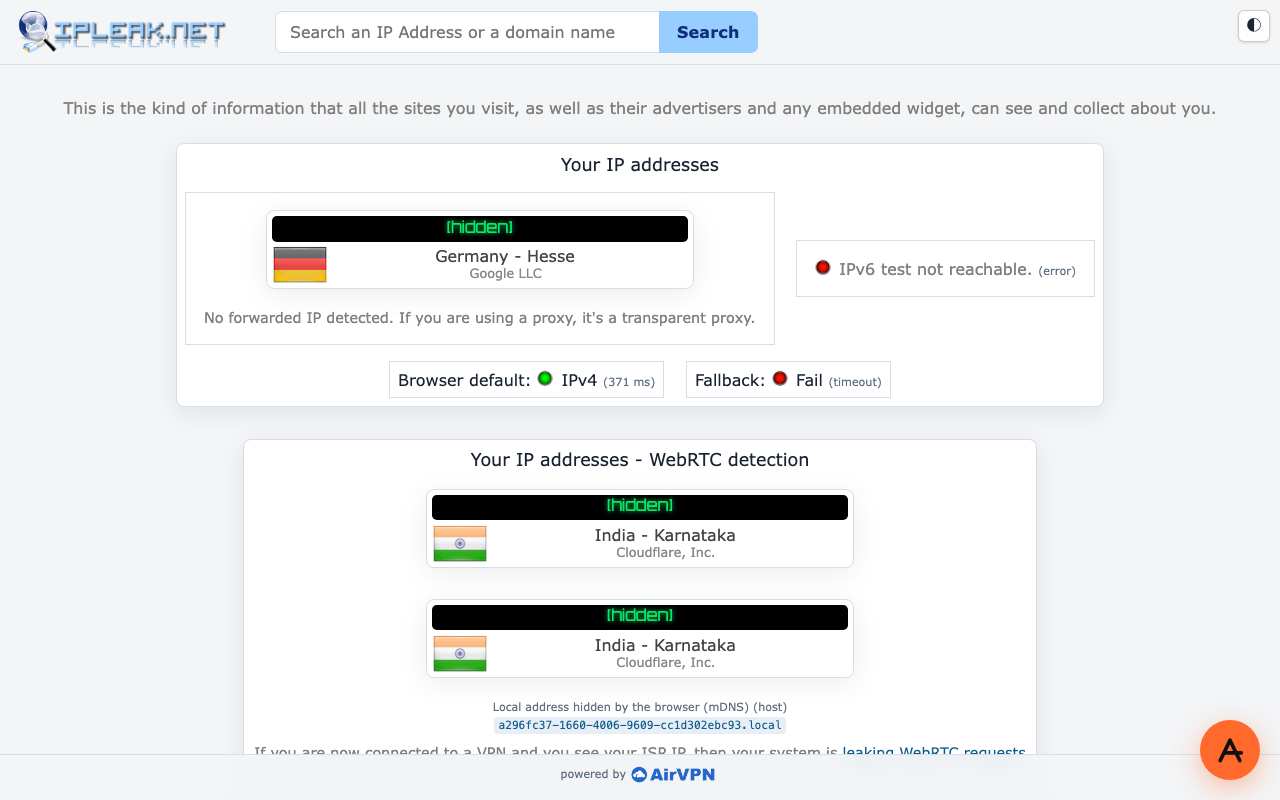
Caption: ipleak.net through AnyProxy Frankfurt, 15 October 2026. The page saw the proxy; WebRTC saw the test machine’s own network. Addresses redacted.
If that matters to you, disable or restrict WebRTC in your browser, or use a VPN with a kill switch for the whole device.
The one-line answer
A VPN kill switch blocks internet traffic when the VPN tunnel drops, so nothing leaks in the seconds it takes to reconnect. Turn it on if you have a VPN. A browser-tab proxy has no tunnel to drop, so it has no kill switch, but it also never covered your other apps or WebRTC.