TikTok has been blocked by whole countries and by single networks. India banned it, with 58 other apps, in June 2020 (Press Information Bureau, 29 June 2020). In Iran, OONI measurements from 15 July to 15 October 2026 recorded 6,045 confirmed blocks in 8,220 tests of TikTok, with only 3.9% loading normally. Bans also come and go: Albania lifted its almost year-long TikTok ban in February 2026 (The Sun, 5 Feb 2026), and Gabon’s media regulator suspended social media, TikTok included, on 18 February 2026 (TimesLIVE, 19 Feb 2026). Even where TikTok is legal, school, office and some hotel networks filter social media.
It is not always the country. In the UAE, OONI recorded 2,309 of 2,370 tests of www.tiktok.com loading normally between 15 July and 15 October 2026, with no confirmed blocks, so a failure there is more likely a hotel, office or school filter.
If your feed stopped loading and other sites work, the network path in front of you is the usual suspect. Because TikTok’s website works when the path allows it, unblocking it is a routing problem, not a hacking problem. This guide walks through three methods, in the order to try them, with what we saw when we tested TikTok through AnyProxy on 15 October 2026.
Why TikTok is blocked
Filtering happens at one of three layers, and the layer determines which fix works:
- DNS filtering — the network refuses to look up
tiktok.com, or answers with a block page. Common on managed and public networks. The weakest form. - IP blocking — the network drops traffic to TikTok’s server addresses.
- SNI inspection or deep packet inspection (DPI) — the network reads the site name in the TLS handshake, or deeper traffic patterns, and blocks anything that identifies as TikTok. National filters with more resources tend to use this.
On a hotel, school or café network the block is usually layer 1 or 2. National blocks can use any mix of the three.
Method 1 — a web proxy (fastest, no install)
A web proxy is a website that fetches TikTok for you. You open the proxy in Chrome or Safari, paste tiktok.com, and TikTok loads inside the same tab. The network in front of you sees an encrypted connection to the proxy’s domain, not to TikTok, so DNS and IP filters aimed at TikTok have nothing to match. A filter that blocks the proxy’s own domain still stops it.
This is the right first attempt when:
- You are travelling abroad and TikTok is not available in the country you are in
- You are on hotel or public WiFi that has blocked social platforms
- You are on a loaner or shared device where you cannot install anything
- You want to watch a public video right now without installing anything
The catch: a web proxy is a website, so it works with TikTok’s website but not with the native TikTok app on your phone. If you are on your personal phone and want the app itself to work, skip to Method 2.
To try it with AnyProxy:
- Open anyproxy.site/unblock/tiktok/
- Pick a region (free: Singapore, Frankfurt, Virginia)
- TikTok loads in the same tab. The first load can sit on AnyProxy’s security-check screen for 15–30 seconds; wait before retrying.
What we saw on 15 October 2026, logged out: through Singapore the Explore page loaded and a video played (its player clock read 21.6 seconds after 30 seconds). Through Virginia a profile header loaded but its video grid said “Something went wrong”. Through Frankfurt the For You feed opened behind a “Log in to TikTok” dialog and an EU cookie banner. We do not test logins, so signing in and uploading are untested.
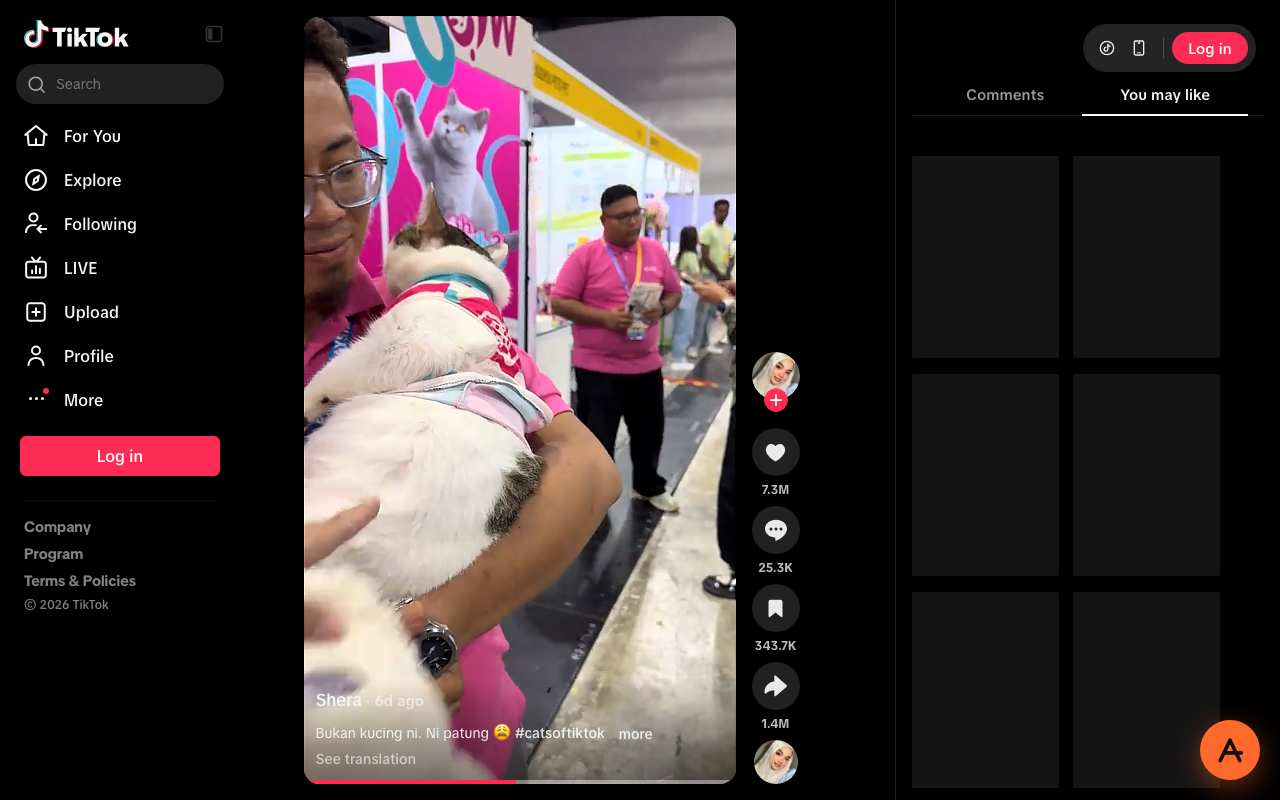
Caption: a TikTok video playing through AnyProxy Singapore, 15 October 2026, logged out.
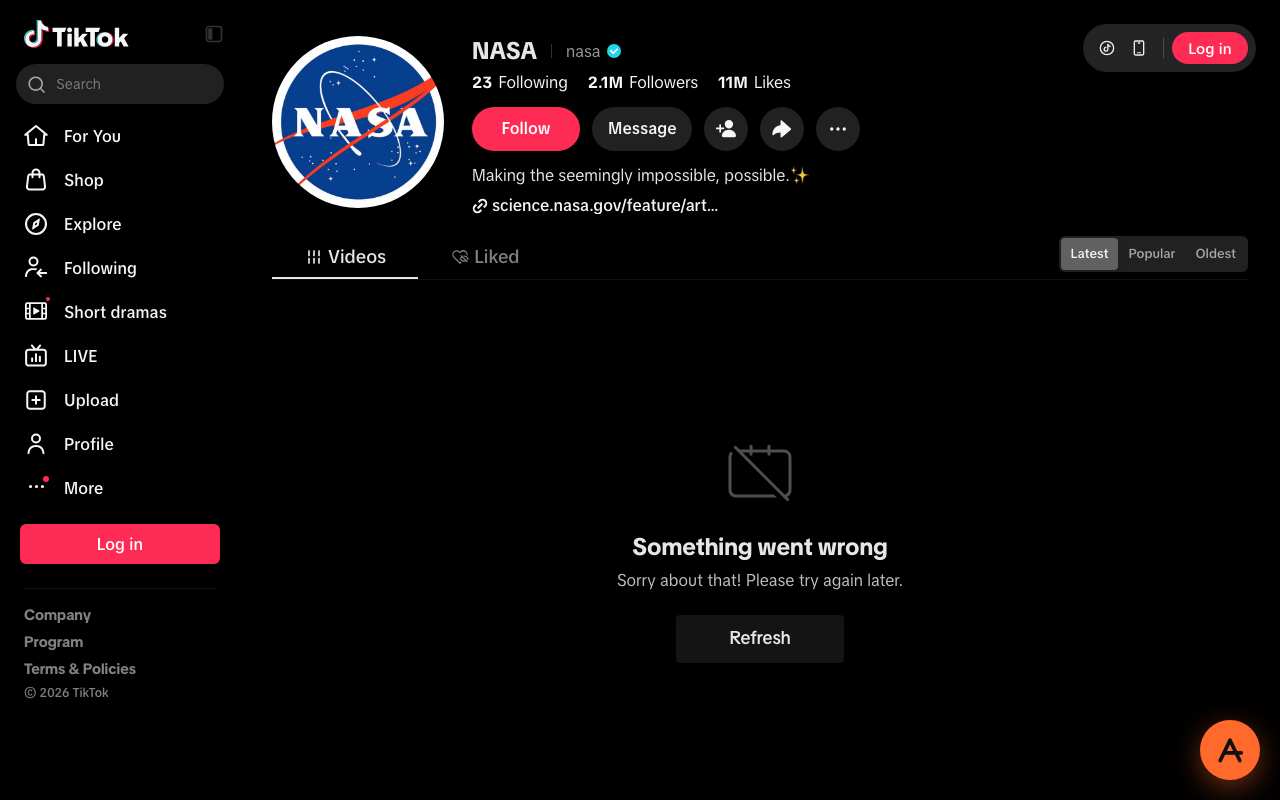
Caption: a TikTok profile through AnyProxy Virginia, 15 October 2026. Header loaded, video grid failed.
Nothing installs. The free tier is enough to try. Pro ($4.99 a month or $39 a year) removes ads and adds Tokyo and Los Angeles.
Method 2 — a VPN (slower to set up, works with the app)
A VPN installs an app that routes every request from your device — browser, TikTok app, background sync — through an encrypted tunnel to a VPN server. TikTok sees the VPN server’s IP, not yours.
VPNs are the right call when:
- You want the native TikTok app to work, not just the website
- You are on your own phone or laptop and are okay installing software
- You want whole-device coverage — messaging, gaming, work tools routed too
VPNs cost more effort. Install, sign up, sign in, pick a server, stay connected. Free VPNs often limit speed or data, and some fund themselves in ways you should read the privacy policy for; a reputable paid VPN is the more dependable choice.
VPNs also fail on more restrictive networks. A managed loaner laptop cannot install a VPN app. A corporate WiFi with an outbound firewall often blocks common VPN ports. If a VPN hangs at “Connecting…”, the network is blocking the VPN, not TikTok.
Method 3 — combined approach (stricter blocks)
On a national filter that inspects traffic, the plain approach often fails: common VPN protocols can be recognised and dropped, and well-known proxy domains can be blocked by name. Options people use:
- Obfuscated tunnels — tools such as V2Ray or Trojan, or VPN traffic wrapped in WebSocket, try to look like regular HTTPS. They are usually found in specialist tools rather than mainstream consumer VPNs.
- Web proxies on large CDNs — when a proxy’s domain is served through a CDN such as Cloudflare, blocking the CDN’s addresses would break many unrelated sites, so filters tend to block the proxy by name instead. That buys time, not immunity.
Check the local law first: in the UAE, for example, Federal Decree-Law 34 of 2021 sets fines of Dh250,000 to 1 million for improperly accessing blocked communication services (Gulf News).
If the block is a local network filter rather than a national one, Method 1 or 2 is usually enough.
Head-to-head at a glance
| Web proxy (AnyProxy) | VPN | Browser extension | |
|---|---|---|---|
| Install anything | No — a web page | Yes, an app | Yes, from a store |
| Setup | Open a page; first TikTok load can take 15–30 s | Install, account, connect | Install from a store |
| Works on a loaner device | Usually, unless the network filters the proxy | Rarely | Sometimes |
| Works with the TikTok app | No (website only) | Yes | No |
| Cost | Free / $4.99 a month Pro | Free tiers and paid plans | Often free |
| Who handles your traffic | The proxy operator (HTTPS to us, decrypted on our servers, re-encrypted to TikTok) | The VPN provider | The extension’s operator, plus whatever permissions you grant it |
Things people ask
Will TikTok ban my account for using a proxy? We have not tested logins, so we cannot promise anything. Sign-ins from a new country or a datacenter address can trigger extra verification on many services. Read TikTok’s terms, and for an account you care about, prefer the official app on a trusted connection.
Can the network see that I opened TikTok? The network sees an encrypted connection to anyproxy.site, and can tell you are using a proxy. It does not see the URL loaded through us or the video content. AnyProxy itself does see it: our privacy page explains what the service can record. Whether the network operator considers proxy use acceptable is a policy question specific to that operator.
Is any of this legal? It depends on the country, and this is not legal advice. In many countries using a proxy is not itself an offence, but some go further: the UAE fines improper access to blocked services (see above). Content you open is still subject to local law, and your school or employer’s rules still apply on their network.
What about the U.S. situation? On 22 January 2026 the deal creating TikTok USDS Joint Venture LLC closed, with Oracle, Silver Lake and MGX holding 15% each and ByteDance 19.9% (NST, January 2026). TikTok’s website opened through our Virginia server on 15 October 2026, though a profile’s video grid failed to load logged out.
The honest recommendation
Need TikTok working in a browser tab right now? Try a web proxy — nothing to install, no software to trust with your whole device. Expect public videos to play and some logged-out pages to fail.
Want the TikTok app on your phone every day? Install a paid VPN. Set up once, forget it.
Both fail? The network is probably inspecting traffic or blocking proxy domains by name. Obfuscated tools are the next step, if they are legal where you are.
Ready to try the fast path? Open TikTok through AnyProxy — no install, no signup, three free regions.