What does the destination site see when I use a proxy?
It sees AnyProxy's address in the region you chose, plus your browser's own details. On 15 Oct 2026 httpbin.org received our browser's user agent and language but no header carrying the visitor's real IP.
Full answer
In detail
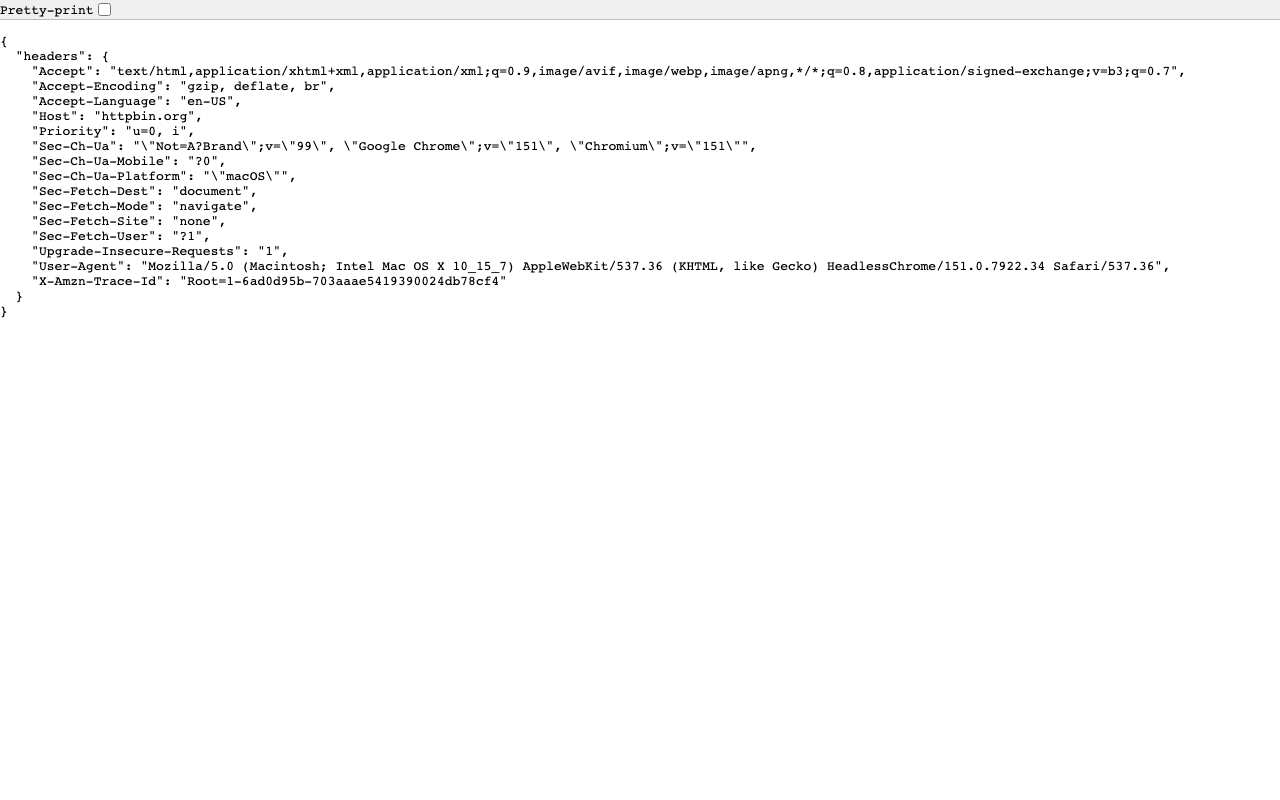
We asked a site to show us exactly what it received. On 15 October 2026 we opened httpbin.org/headers through AnyProxy's Singapore server; it echoes back every header of the request. The site saw AnyProxy's server as the sender and the country of the region you pick, which is why Wikipedia, YouTube and others show local language and prices. It also received the browser's own details: its user agent (browser and operating system), its preferred language (en-US), platform hints, and the usual fetch headers. What it did not receive was any X-Forwarded-For or Forwarded header passing your real IP address along, which some proxies add. So the site cannot see your address through AnyProxy, but it can still recognise you in other ways. If you sign in, it knows your account. Cookies it set earlier in the proxied session identify you on later visits. Your browser details can help fingerprint you. And services that check where your account or payment card is registered keep doing so. Finally, the site can often tell it is talking to a proxy, because AnyProxy's addresses belong to a cloud provider; Google and Reddit challenged or blocked them in the same week's tests.
In practice
A request, as the destination receives it
The header list httpbin.org echoed back is ordinary browser traffic: user agent, language, platform hints and fetch metadata, with no field naming the visitor's IP. The address the site logged was AnyProxy's Singapore server. Your browser's identity travels through; your network address does not.
Sources: Geo-block - glossary · Does a proxy hide my IP?
We checked
What a site received through AnyProxy, 15 October 2026

People also ask
See also
Related questions