When someone says “the site is blocked”, they are describing a symptom. Underneath that symptom sits one (or more) of four specific technical layers doing the blocking. Knowing which layer applies to your situation determines which countermeasure works. This cornerstone maps the four layers, gives an example of who uses each, and explains which defeat solves each layer.
Layer 1 — DNS filtering
The cheapest layer to deploy and the first line of most consumer-facing filters. When your device wants to reach youtube.com, it first asks a DNS resolver for youtube.com’s IP address. If the resolver is under filter policy, it lies — returns NXDOMAIN (domain does not exist), a block-page server IP, or nothing at all. Your device has no address to connect to, so it fails.
Who uses it: Many managed Wi-Fi filters and ISPs implementing government blocklists. Iran is a well-documented case: OONI counts most Iranian blocks as “confirmed” because networks return recognisable filtering answers, and China’s firewall injects forged DNS answers (OONI, 2019).
How to detect it: Change your DNS to Cloudflare 1.1.1.1 or Google 8.8.8.8. If the site loads, DNS filtering was the block. If not, you are hitting a deeper layer.
How a proxy gets past it: Your browser asks the resolver for AnyProxy’s names (anyproxy.site and a regional server such as sg.anyproxy.site), not youtube.com. As long as those names are not on the filter list, the resolver answers normally, your device connects to the proxy, and the proxy asks the destination on your behalf. If the filter adds the proxy’s names, this stops working.
Layer 2 — IP-level blocking
More work to maintain but common at the ISP or firewall level. The filter drops packets destined for specific IP addresses. Changing your DNS does not help — even if you look up the destination correctly, the packets fail in transit.
Who uses it: National filters and enterprise firewalls that block known address ranges, for example of VPN providers or large platforms. OONI found Tanzania blocking X in May 2025 by IP, with signs of TLS interference (OONI, 2025).
How to detect it: If changing DNS does not help and the site fails on this network but loads on another, the block is deeper than DNS; IP blocking is one possibility. Connecting to an HTTPS site by raw IP usually fails for certificate reasons anyway, so it is not a clean test.
How a proxy gets past it: Your packets go to the proxy’s address, not the destination’s. The proxy’s server, on a different network, reaches the destination. If the proxy’s own addresses are blocked, this stops working.
Layer 3 — Deep packet inspection (DPI)
Reads not just packet headers but traffic contents and patterns: VPN protocol signatures, application fingerprints, even metadata of encrypted connections. It can also act, for example by injecting resets that cut a connection.
Who uses it: OONI’s 2018 study of Egypt found ISPs blocking mainly with DPI that resets connections, with no block page (OONI, 2018). On 20 August 2025 China’s firewall injected forged TCP resets into every port-443 connection for about 74 minutes (GFW Report). Many enterprise security gateways also include DPI.
How it identifies traffic: WireGuard, OpenVPN, IKEv2 all have distinctive handshake patterns that DPI can match reliably. Even TLS traffic has “JA3” and “JA4” fingerprints that identify the specific client library. VPN traffic that has not been obfuscated is usually recognisable within one round trip.
How a proxy relates to it: A web proxy runs over ordinary HTTPS from your own browser, so its TLS fingerprint is your browser’s, and there is no VPN protocol for DPI to match. That does not make it invisible: DPI can still act on the proxy’s hostname (layer 4), and an event like China’s August 2025 reset cuts every HTTPS connection, proxies included.
Layer 4 — TLS SNI inspection
The specific DPI technique that reads the TLS Server Name Indication field from the encrypted-connection handshake. SNI is sent in plaintext in the TLS ClientHello (the first bytes of every HTTPS connection) because one IP can host many HTTPS sites and the server needs to know which certificate to present. The filter reads the SNI hostname and applies policy.
Who uses it: OONI documented SNI filtering of Wikipedia in China in 2019. Many enterprise and school filters also read SNI as an upgrade over pure DNS blocking.
Why it matters: Even with TLS encrypting the content, the hostname leaks in the handshake. ECH (Encrypted Client Hello) hides it, but only where both the browser and the server support it.
How a proxy relates to it: The SNI your browser sends names the proxy, not youtube.com. When we checked on 15 October 2026, anyproxy.site (behind Cloudflare) published an ECH key, but AnyProxy’s regional servers, where proxied pages load, did not offer ECH. So a filter reads “sg.anyproxy.site” or similar. If its policy allows that name, the page loads; if it blocks proxy sites by name or category, it does not. See can my ISP see I used a proxy?.
Which layer is filtering you right now?
Diagnosis in order of speed:
- Try public DNS (1.1.1.1). If the site loads, layer 1 (DNS) was the block. Done.
- Compare another network you are allowed to use, such as your own mobile data. If the site loads there, the block is on the first network (layers 1–4). If it fails everywhere, the site itself may be down or refusing your country.
- Try a web proxy (like AnyProxy) from the original network. If that works, the block targeted the destination. On a school or work network, check the acceptable-use policy first.
- If the web proxy also fails, the network probably blocks the proxy’s names or addresses too, or there is a wider outage. Some networks block proxy sites as a category.
- If the proxy loads but the site shows a captcha or refusal page, the destination is filtering proxy addresses, not your network (see layer 5).
What the sources show per country
We only list techniques a source documents:
| Country | Documented technique | Source |
|---|---|---|
| China | DNS injection and SNI filtering (Wikipedia, 2019); forged TCP resets on all port-443 traffic (20 Aug 2025) | OONI 2019; GFW Report 2025 |
| Iran | Recognisable filtering answers counted as “confirmed” blocks by OONI across major networks (Jul–Oct 2026); IPv6 and HTTP/3 blocked during 2026 shutdowns | OONI; Al Jazeera, 31 May 2026 |
| Egypt | DPI that resets connections, no block page; HTTP hijacking (2017–2018) | OONI 2018 |
| Tanzania | IP blocking of x.com and twitter.com, signs of TLS interference (May 2025) | OONI 2025 |
For other countries we did not find a current source on technique. See internet censorship by country in 2026 for what each country blocks.
Layer 5 — filtering inside the connection, and at the destination
Not a network layer strictly, but it decides many real outcomes.
On managed devices: corporate and school security tools can inspect encrypted traffic when the organisation’s root certificate is installed on the device, effectively a man-in-the-middle on TLS. Then the URLs and pages inside the proxy connection are visible too.
At the destination: sites run their own checks after the request arrives. They can recognise data-centre addresses, such as AnyProxy’s, and show a captcha or refuse. On 15 October 2026 Reddit refused every AnyProxy region, and Google Search showed its “unusual traffic” reCAPTCHA. No network-side trick changes that, because it is the destination deciding.
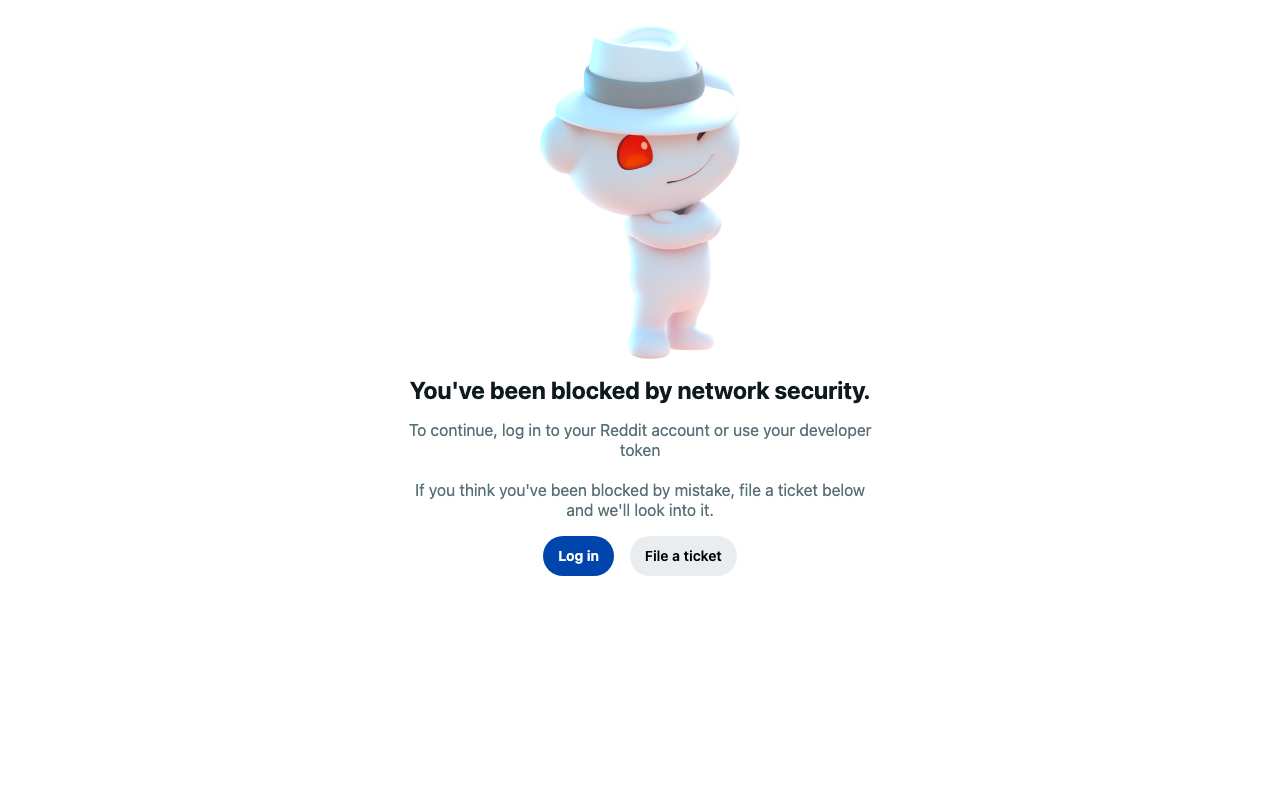
Caption: Reddit’s own refusal page for AnyProxy Singapore, 15 Oct 2026. Frankfurt and Virginia got the same page.
Layer choice determines your escalation path
If you are debugging a “site not loading” problem, working through the layers in order (DNS → IP → DPI → SNI → destination) is faster than throwing every countermeasure at once. If changing DNS fixes it, nothing heavier is needed. Where filtering is deeper, a web proxy is a lighter option than a full VPN when the goal is one blocked page, as long as the proxy itself is reachable and the destination accepts it.
For the specific how-tos on defeating each layer, see the help center. For the tool-selection question, see proxy vs VPN vs Tor decision framework.