A web proxy is a website that opens other websites for you inside a browser tab. That sentence hides three interesting technical layers: how the request flow travels, what each layer of the network sees, and how the HTML gets rewritten so that clicking a link inside the proxied page keeps the session routed through the proxy. This cornerstone covers all three.
The three-hop request flow
Every proxied page load involves three network conversations chained together:
- Browser → proxy over HTTPS. You type a site into anyproxy.site, and the proxied page then loads from a regional server such as sg.anyproxy.site (Singapore), fr.anyproxy.site (Frankfurt) or us.anyproxy.site (Virginia). Your browser verifies that server’s certificate and sends its requests inside the encrypted channel.
- Proxy → destination over HTTPS. The regional server, in a data centre, opens its own TLS connection to the destination, for example youtube.com, and fetches the page with your browser’s own headers. If the destination only offers plain HTTP, this leg is not encrypted.
- Destination response → proxy → browser. The destination hands back the HTML, images, scripts, and CSS. The proxy rewrites the HTML so all subsequent requests route through the same proxy, then streams the result back through the original TLS connection to your browser.
The trick that unblocks the destination is that hop 2 does not cross your local network. A firewall between your device and the internet sees only hop 1: an HTTPS connection to AnyProxy’s servers, and nothing about hop 2. AnyProxy’s /browse entry point accepts only a site’s origin (such as https://example.com/); a pasted deep link opens the site’s home page, and you navigate from there. That is a deliberate security design.
What each layer sees
Understanding “what does X see” is the whole security-and-privacy story of a web proxy. Four observers matter:
Your ISP or managed Wi-Fi: sees TLS connections from your device to AnyProxy, your own IP and the amount of traffic. When we checked on 15 October 2026, anyproxy.site (served through Cloudflare) published an Encrypted Client Hello key, but the regional servers did not offer ECH, so a name like sg.anyproxy.site is readable via TLS SNI in every connection. The network can therefore tell you used AnyProxy and which region. It cannot see which pages you loaded: those travel inside the encryption. On a managed device with TLS inspection, the organisation may see more. See can my ISP see I used a proxy?.
The destination site: sees a request from the proxy server’s IP address in the region you picked: Singapore, Germany or the US on the free tier. In our 15 October 2026 header check, the site received the browser’s own user agent and language and no header carrying the visitor’s address. Two caveats: WebRTC can still reveal your real IP to a page (our WebRTC leak test showed it), and cookies or an account you sign into identify you regardless of IP. Sites can also recognise data-centre addresses: Reddit refused every AnyProxy region on 15 October 2026.
The proxy operator (AnyProxy): handles the decrypted content between the two encrypted legs, so it can see the URL and the response. AnyProxy is not a no-logs service: it can retain operational records, such as destination hosts, session identifiers and a hashed IP address, as the privacy policy explains.
Anyone else on the network path: sees TLS on each encrypted leg and cannot read inside it.
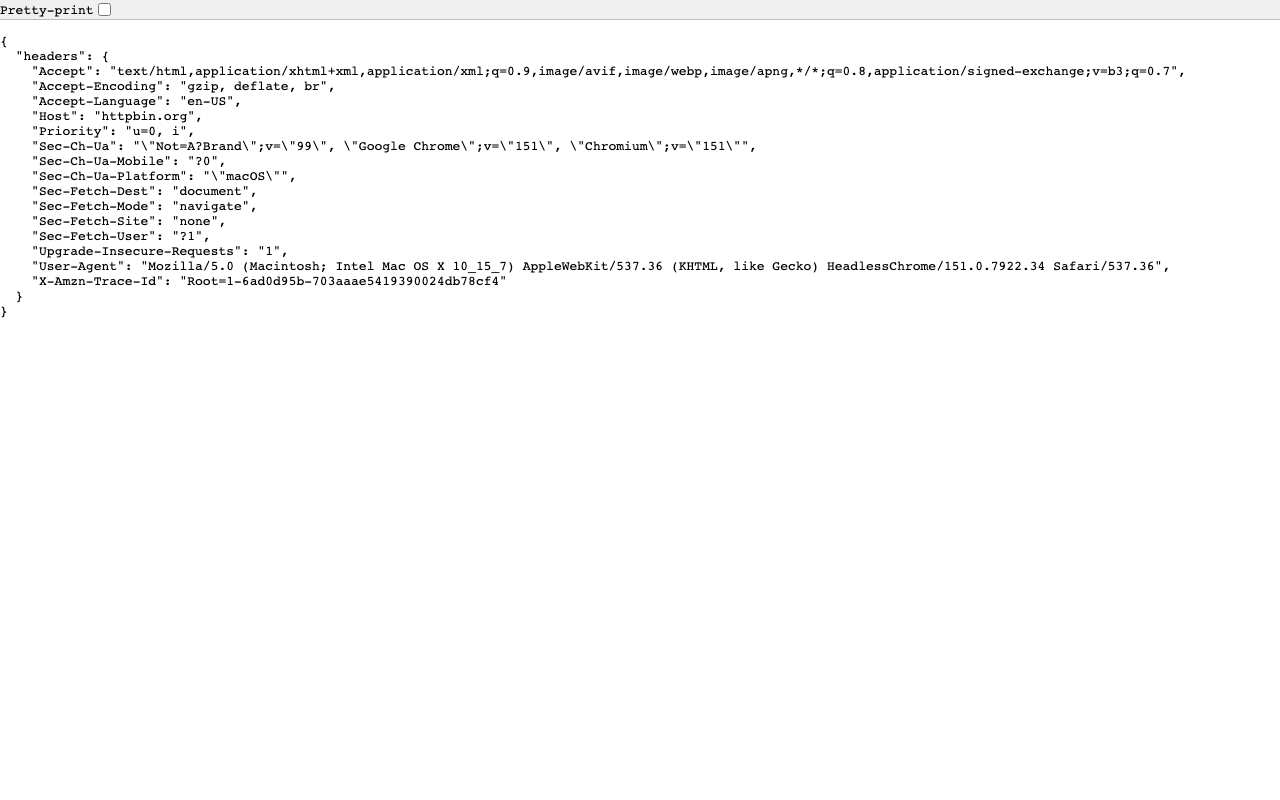
Caption: The request headers httpbin.org received through AnyProxy Singapore, 15 Oct 2026: the browser’s own headers, and no field naming the visitor’s IP.
The pattern matters for networks that filter by DNS, IP or TLS SNI. All three target a hostname or IP address, and a web proxy puts its own in place of the destination’s. The same methods can be pointed at the proxy’s names and addresses, which is why proxy domains get blocked too.
HTML rewriting: the part that makes it feel native
If a proxy just fetched the initial page and handed it back, clicking any link inside would break — the link would point at the destination directly, and your browser would try to load it without the proxy. The rewriting layer prevents that.
When the server receives the destination HTML, it rewrites the URLs it finds:
- A link such as
<a href="/watch?v=abc">is mapped onto the regional proxy host. On AnyProxy, proxied addresses look likehttps://sg.anyproxy.site/_o/<encoded origin>/watch?v=abc, where the encoded part is the destination’s origin in base64, so clicking it goes back through the proxy. <img src="//i.ytimg.com/vi/abc.jpg">becomes a proxy-fronted URL that fetches the image on your behalf.<script src="...">gets the same treatment.- CSS
url(...)references, JavaScript-generated URLs, WebSocket connections — all rewritten.
Proxies also need to catch URLs that JavaScript builds after the page loads, so they intercept calls such as fetch() and XMLHttpRequest at runtime with an injected script or a service worker. Newer engines like Scramjet push some of this rewriting into the browser via service workers rather than doing it all server-side.
The user-visible effect is that clicking around the proxied page feels native — every navigation stays inside the proxy tab, and the destination site behaves normally. When the rewriting misses a URL, which happens on complex single-page apps, that request breaks or escapes the proxy. No rewriter is perfect: in our 15 October 2026 tests, YouTube regular videos played but Shorts stayed black, and X profiles were often blank.
Why the proxy needs HTTPS on both hops
Hop 1 uses HTTPS so that your ISP or Wi-Fi provider cannot read which pages you asked the proxy to fetch. Hop 2 uses HTTPS so that the network between the proxy and the destination cannot read them either, and because most sites now redirect plain HTTP to HTTPS anyway. These are two separate encrypted connections: the proxy in the middle decrypts one and re-encrypts into the other, which is why the operator’s handling of data matters. For a plain-HTTP destination there is no second encrypted leg.
This is why an HTTPS-only web proxy is the modern default. Older “HTTP proxy” concepts that tunnel plain HTTP are now mostly relegated to caching and enterprise inspection use cases where the operator wants to see request contents.
Why region choice matters
The extra leg from your browser to the proxy costs time, and distance sets how much. AnyProxy’s free tier has three regions, Singapore, Frankfurt and Virginia; Pro adds Tokyo and Los Angeles, and São Paulo is listed as coming soon. The region picker shows a live ping from your browser to each one.
We measured the cost once, from India on 15 October 2026: Wikipedia opened in a median 1.15 s directly, 1.41 s through Singapore, 2.42 s through Frankfurt and 3.65 s through Virginia (four runs each). The nearest region added about a quarter of a second; the farthest tripled the time. Details in proxy speed and latency explained.
Limits: what a web proxy cannot do
The three-hop mechanism handles browser traffic well. It does not handle:
Native mobile apps. The Instagram app on your phone does not route through the browser — a proxy in a browser tab has no visibility into app traffic. Use the mobile web version (instagram.com in Chrome or Safari) inside the proxied browser tab instead.
Paid streaming services. Netflix, Disney+ and similar services need an account, apply region and licence checks, and Netflix documents a “You seem to be using a VPN or proxy” error. DRM itself is not the barrier: a Widevine-protected test clip from Google’s Shaka Player demo played through AnyProxy on 15 October 2026. We have not tested logged-in playback on paid services. See streaming video through a proxy.
Voice-over-IP and WebRTC. Video calls, voice chat and peer-to-peer connections use WebRTC, which connects outside the proxied page and is not routed by a web proxy. It can also reveal your real IP address to the page. Text chat in a web app may work; calls should not be expected to.
Non-HTTP TCP protocols. Games, IRC, custom apps that speak proprietary TCP — a web proxy is HTTP-only. For those, a SOCKS proxy or full VPN is needed.
When a web proxy is the right tool
The pattern fits a specific job: one blocked browser page, right now, on a device where you cannot or do not want to install anything. For that job, the three-hop web proxy is the lightest tool that works. For anything else, see the proxy-vs-VPN-vs-Tor decision framework for the broader tool selection guide.