Proxy
A proxy is a server that makes network requests for you and passes the answers back, so the site you reach deals with the proxy instead of your device.
Explanation
In depth
Think of a proxy as a go-between. Your device sends its request to the proxy, the proxy sends its own request to the destination, and the reply comes back the same way. The destination sees the proxy's address and location, not yours. That single fact explains most uses: companies route staff traffic through a proxy to filter and log it, websites put one in front of their servers to absorb attacks, and people use one to reach a site their own network blocks. Proxies differ mainly in where they sit and who chose them. Some you set in your device or browser settings (HTTP and SOCKS proxies). Some are inserted by the network without asking (transparent proxies). Some run on the website's side, such as Cloudflare (reverse proxies). A web proxy like AnyProxy is a website you open in a tab. What a proxy does not change is anything your browser sends itself: cookies, accounts you sign into and the browser's own description of itself still reach the site. And whoever runs the proxy handles the traffic it relays, so the operator has to be someone you are willing to trust.
In practice
Proxy in the real world
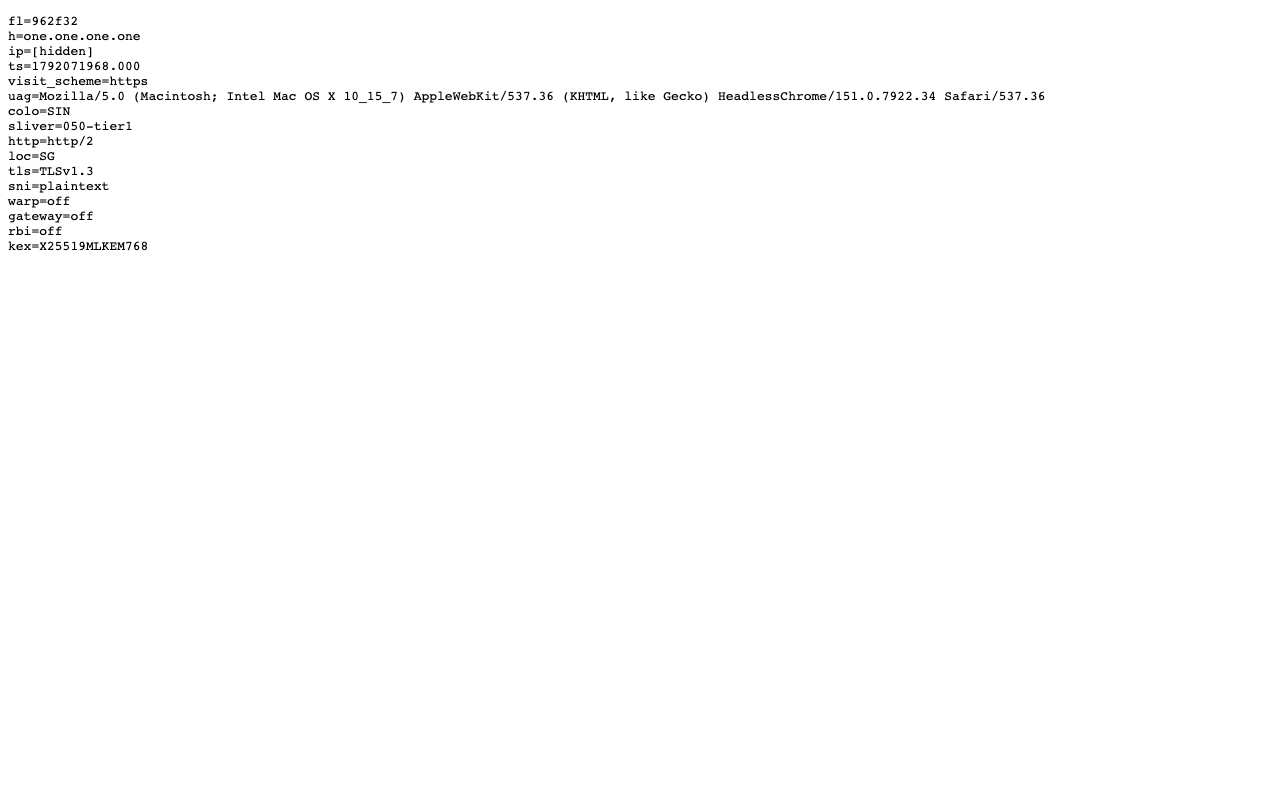
On 15 October 2026 we opened Cloudflare's diagnostic page, one.one.one.one/cdn-cgi/trace, through AnyProxy's Singapore server. It reported loc=SG and colo=SIN, Cloudflare's Singapore data centre, and listed the proxy's IP address, which we hid in the screenshot. Nothing on the page described the network the test browser was really on. The same page did echo the browser's user-agent string unchanged: a proxy changes where a request appears to come from, not what your browser says about itself.
Sources: Cloudflare trace page used in the test · RFC 9110 - HTTP Semantics (CONNECT)
We checked
What a site sees through a proxy
Questions about Proxy
Related terms