AnyProxy

Get Pro
Glossary · VPN & tunneling

WebRTC leak

Also calledwebrtc ip leak
Definition

A WebRTC leak is when a website uses the browser's built-in calling technology (WebRTC) to discover your real public IP address, even though your normal page traffic goes through a proxy or VPN.

Explanation

In depth

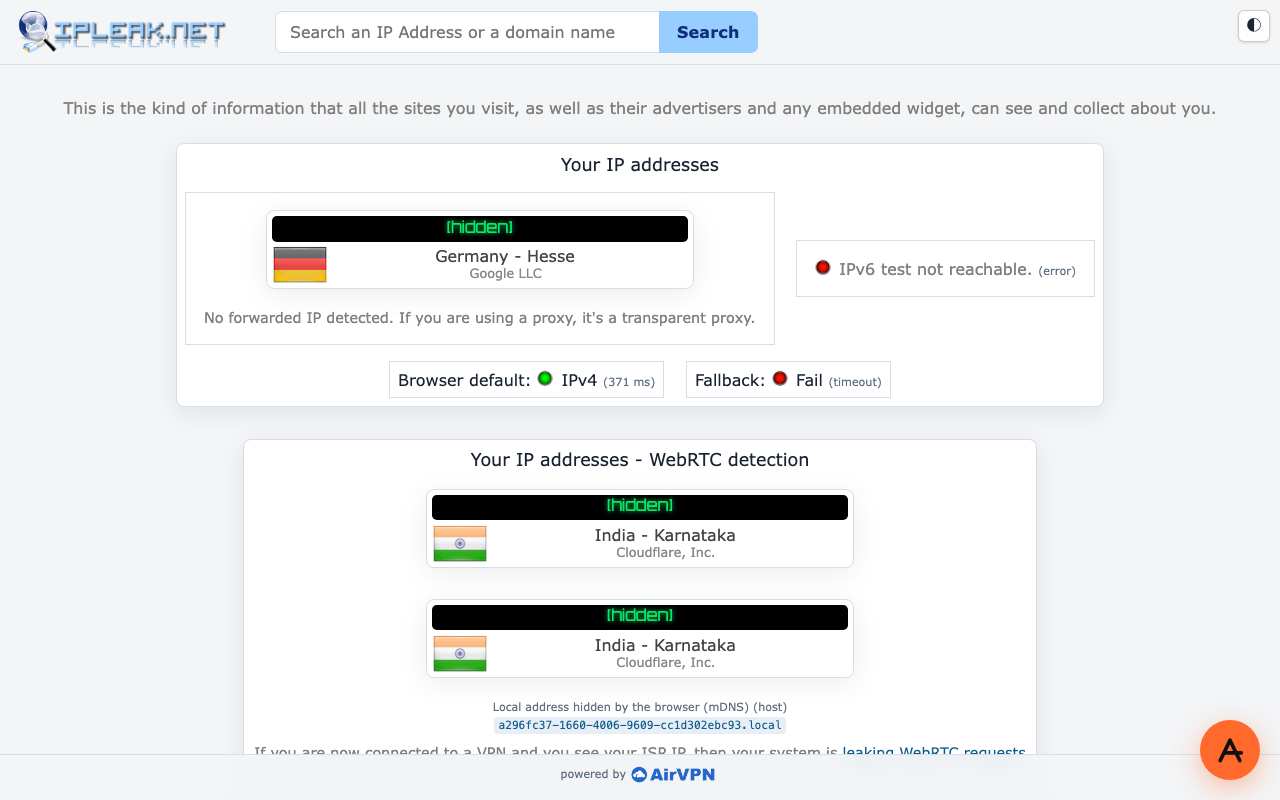
WebRTC lets a web page set up voice, video and data connections directly between browsers. To find a route between two people, the browser contacts STUN servers on the internet and learns the public address its network presents. A page can trigger that process with a few lines of JavaScript, without any call or permission prompt, and read the addresses back. Modern browsers hide your local network address behind a random '.local' name, but they still reveal the public one. We ran browserleaks.com/webrtc through AnyProxy's Singapore region on 15 October 2026. The page's normal IP rows showed the Singapore exit. Its WebRTC section reported 'No Local IP Leak', but also 'WebRTC IP doesn't match your Remote IP' and listed two public addresses of the test machine's own connection. ipleak.net through Frankfurt showed the same pattern. In plain terms: a web proxy rewrites and relays web pages; it does not carry WebRTC traffic, so it does not hide your IP from WebRTC. If that matters, disable WebRTC or restrict it with your browser's settings or a trusted extension, or use a VPN that also covers the browser's UDP traffic.

In practice

WebRTC leak in the real world

WebRTC lets browsers make voice and video calls directly. To find a path between two people it asks STUN servers for your public address — and a page could read that address even if you were browsing through a proxy. Browsers have tightened this, hiding local addresses behind random .local names, but WebRTC traffic still does not go through a web proxy. That is why calls on WhatsApp Web, Discord and Instagram DMs fail through one.

Sources: RFC 8828 - WebRTC IP Address Handling Requirements · BrowserLeaks - WebRTC leak test

We checked

WebRTC leak tests opened through AnyProxy
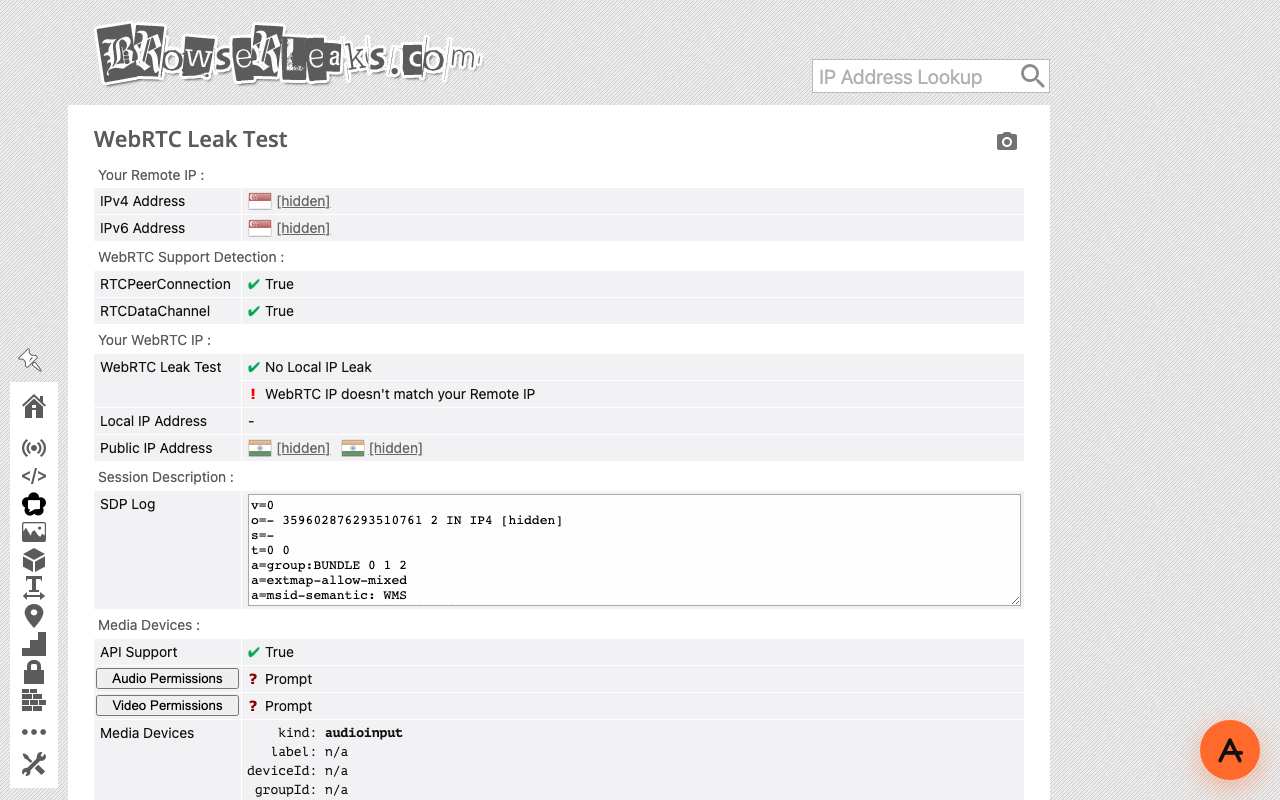
BrowserLeaks WebRTC Leak Test opened through AnyProxy Singapore: remote IP rows show a Singapore flag, WebRTC public IP rows show the test machine's own network, addresses hidden

WebRTC leak test on browserleaks.com/webrtc through AnyProxy

Did not work · SG exit · 2026-10-15

The page's HTTP view shows the Singapore exit (Google LLC). The WebRTC section reports 'No Local IP Leak' but 'WebRTC IP doesn't match your Remote IP' and lists two public addresses of the test machine's own connection (a Cloudflare WARP link, India flag). A web proxy does not route WebRTC.

ipleak.net through AnyProxy Frankfurt: main IP box shows Germany, Google LLC; IPv6 test not reachable; WebRTC box shows the test machine's own network; addresses hidden

IP, IPv6 and WebRTC check on ipleak.net through AnyProxy

Partly worked · FR exit · 2026-10-15

Your IP addresses box shows Germany - Hesse, Google LLC (the Frankfurt exit) and 'No forwarded IP detected'. The IPv6 test reports 'not reachable (error)'. The WebRTC detection box still shows two addresses of the test machine's own network (Cloudflare, India).

Questions about WebRTC leak

Does a web proxy hide my IP from WebRTC?
No. Our tests through AnyProxy showed the test machine's own public addresses in the WebRTC section while the page itself saw the proxy. Disable or restrict WebRTC, or use a VPN, if that matters to you.
Why do video calls fail through a web proxy?
Calls use WebRTC, which sends audio and video directly between devices rather than through the proxied web page.
What does 'No Local IP Leak' mean on a test page?
Your browser replaced your private LAN address with a random .local name. That protects the address inside your home or office network, but says nothing about the public address WebRTC can still reveal.

Related terms

VPNA VPN (virtual private network) is software that sends all of a device's network traffic through an encrypted connection to a provider's server, which then contacts websites on the device's behalf.DNS leakA DNS leak is when your device keeps asking its usual DNS server (often the ISP's) to look up site names while you think a VPN or proxy is handling your traffic, so the network still learns which sites you visit.IPv6 leakAn IPv6 leak is when a VPN protects your IPv4 traffic but your device still sends IPv6 traffic directly, exposing your real IPv6 address to websites.IP addressAn IP address is the number that identifies a device or server on a network, so packets know where to go; every website you visit sees one for you.

Put the concept to work

Try AnyProxy free — no install, no signup, six regions.

Open a blocked page