Safety of a web proxy comes down to one question: what can the operator do that you cannot verify? A well-run proxy publishes specific policies you can check; a shady one hides behind vague marketing language. This cornerstone covers the four safety dimensions that matter, the specific claims a trustworthy operator makes, and the specific mistakes that expose users regardless of how good the operator is.
The four safety dimensions
Every web proxy sits between you and the destination site. That means there are four separate observers with different views into your session, and each is a separate safety consideration.
Dimension 1 — Traffic in transit
What can be observed: the TLS-encrypted connection from your browser to the proxy, and the TLS-encrypted connection from the proxy to the destination.
Connection boundaries: HTTPS protects your browser-to-proxy connection. HTTPS destinations have a separate encrypted proxy-to-destination connection; HTTP destinations do not. The proxy operator processes decrypted content between connections. This is not end-to-end encryption between you and the destination.
Red flags: any proxy that mentions “HTTP fallback” for the client-to-proxy hop, or does not verify destination TLS certificates. Both are relics of 2010-era proxy code that should not exist in 2026.
Dimension 2 — Logging at the proxy
What can be observed: while the proxy processes your request, it necessarily sees the URL and response contents in memory.
AnyProxy records: The service can retain destination, session and operational information. It does not offer a blanket no-logs guarantee or automatic deletion of all records after 30 days. Read the privacy policy and contact the operator for retention and deletion details before relying on it for sensitive activity.
Red flags: vague privacy pages that say “we respect your privacy” without specifying what is or is not logged. Retention windows unspecified. Third-party data-sharing not enumerated. If the policy would not survive a data subject access request under GDPR, it does not protect you.
Dimension 3 — What destinations see
What can be observed: every request that reaches the destination shows the proxy’s IP address as the source.
What changes: the proxy substitutes its IP for yours in ordinary page requests. In our 15 October 2026 header check, the site received the browser’s own headers and no field carrying the visitor’s address. What destinations still see: cookies you send, your browser fingerprint (user agent, screen size, fonts, canvas, WebGL) and any account you sign into.
The WebRTC gap: WebRTC, the browser feature behind calls, does not go through a web proxy and can reveal your real IP address to the page. In our WebRTC leak test through AnyProxy Singapore on 15 October 2026, the page saw the Singapore server as the visitor, but its WebRTC section listed the test machine’s own public addresses. If that matters to you, restrict WebRTC in your browser or use a different tool. More in the what does the destination site see FAQ.
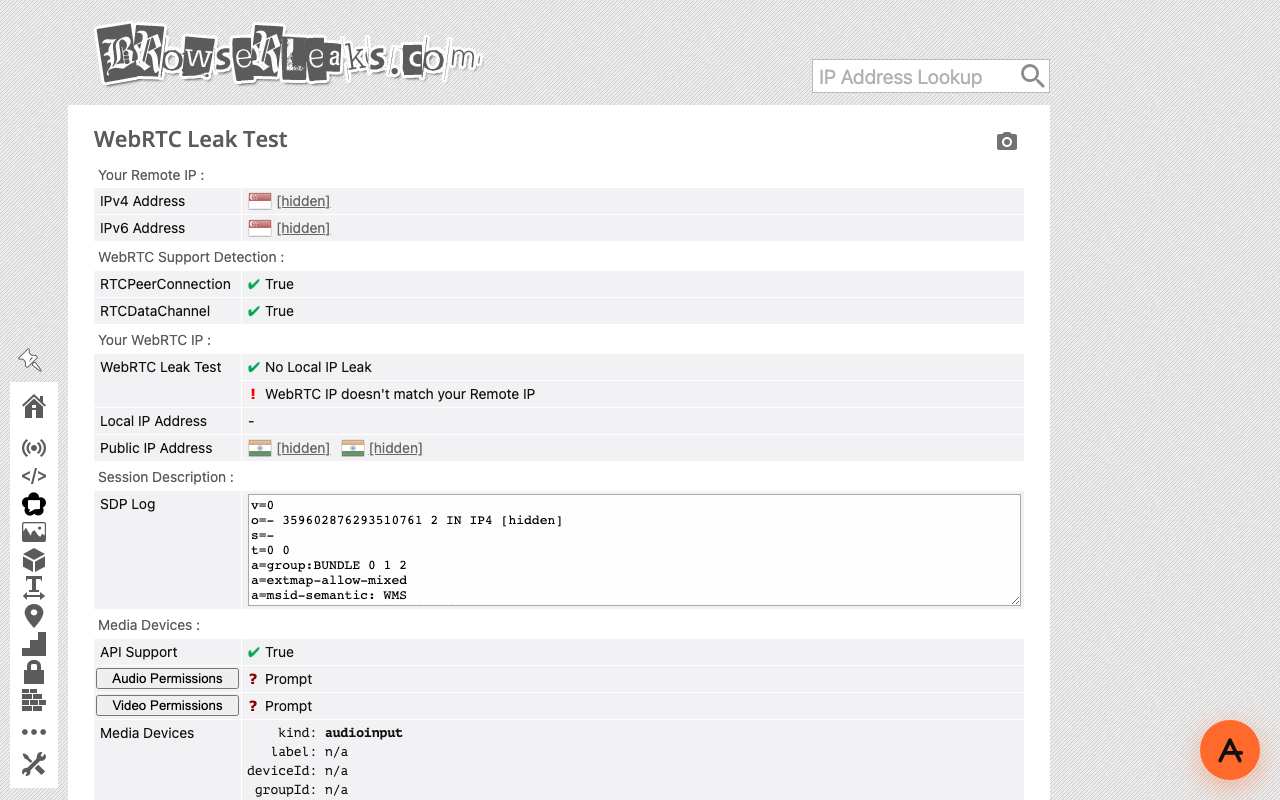
Caption: BrowserLeaks WebRTC test through AnyProxy Singapore, 15 Oct 2026. The page saw Singapore; WebRTC exposed the test machine’s own addresses (hidden here).
Dimension 4 — What your local network sees
What can be observed: the outbound TLS connection from your device to the proxy domain.
What it learns: the TLS handshake reveals the server name via SNI. When we checked on 15 October 2026, anyproxy.site (served through Cloudflare) published an Encrypted Client Hello key, but AnyProxy’s regional servers, where proxied pages load, did not offer ECH. So your network can read a name like sg.anyproxy.site and knows you used AnyProxy and which region. It cannot see which sites you opened inside the encrypted connection, unless a managed device has TLS inspection. See can my ISP see I used a proxy?.
Red flags: where connecting to a proxy is itself risky, the visible connection is the problem, and a web proxy does not hide it. Some countries restrict circumvention tools; see proxy legality and the proxy vs VPN in Iran decision guide.
The specific mistakes that expose users
Even a well-run proxy cannot protect against these:
Entering a password on the proxy landing. When you visit anyproxy.site, that landing page is our site — not the destination. If any page prompts for a service password before the destination has visibly loaded, it is phishing. The right pattern is always: enter the site → wait for it to load with its own branding → then sign in on that site’s own page. Never on the proxy landing. See the log-in-through-a-proxy help guide for the full walkthrough.
Reusing passwords across proxied and non-proxied sessions. If you have password-reused a credential across accounts, a compromise on any one of those accounts (including via other channels) links your proxy activity to your identity via the credential. Use a password manager and unique passwords per site.
Signing into accounts during “anonymous” browsing. Any account login identifies you to that destination regardless of IP. If the goal is anonymity from the destination, do not sign in. If the goal is unblocking access, signing in is fine — but expect the destination to send a “new location” security email.
Trusting incognito mode for network privacy. Incognito only skips local browser storage. It does not hide anything from the network, the destination, or the proxy. Combining incognito with a proxy adds no network privacy; it just cleans up local cookies afterwards.
Assuming nothing stays on the device. Files you download stay on your device. Browser history also keeps the proxied addresses, and those carry the real site’s address in encoded or plain form. Cookies and other site storage can remain too. On a borrowed device, use a private window and clear it afterwards; closing a tab does not erase anything on the server side either.
What AnyProxy specifically does
AnyProxy processes requests through its servers. Operational logging can include destination and session information; account and payment records can identify users. The privacy policy explains the current disclosure and contact route for retention and deletion questions.
HTTPS to AnyProxy and HTTPS from AnyProxy to a destination are separate connections. HTTP destinations do not have that second encrypted leg. Encryption in transit does not prevent the operator from processing the content.
Free access without signup does not mean no persistent identifiers. Browser storage, session cookies, account records and operational data must be considered separately. Closing a tab does not necessarily erase local storage or server records.
How to evaluate any other proxy
Same checklist works for any competitor:
- Does the privacy page specify retention windows in days?
- Does it enumerate every third party that touches traffic?
- Does it distinguish operational metrics from personal data?
- Are the ads inside the proxied session, or only on marketing pages? (Inside-session ads mean an ad network is placed between you and the destination — a much larger data-sharing scope than marketing-page ads.)
- Is there a written DMCA / abuse process with specific timelines?
- Are compliance frameworks named specifically (GDPR, CCPA) rather than boilerplate (“we respect your privacy”)?
A checklist is not a security audit. Even a clearly documented proxy handles content on your behalf; use a direct trusted connection for sensitive activities.
For a ranked comparison based on measured headers and certificates, see the safest web proxies 2026 list.
Threat models where a web proxy is not enough
Web proxies handle everyday network-level privacy well. They do not handle:
- Correlation attacks by a single all-seeing observer. If the same entity can watch both your ISP and the destination site, they can correlate you regardless of the proxy. This is a Tor / VPN-chain problem.
- Browser fingerprint uniqueness. Even with a proxy, your browser’s specific fingerprint may be uniquely identifiable across sessions. Address with anti-fingerprint browser configurations (Tor Browser, Brave Shields) not with proxy choice.
- Malware or keyloggers on your device. Once malware is running on your machine, the proxy is downstream of the compromise.
- Legal compulsion of the proxy operator. Operators can be compelled to produce the records they hold. AnyProxy is not a no-logs service and its privacy policy notes that some records may need to be kept for legal or security obligations.
For those threat models, layered defence is the answer — Tor, dedicated privacy OS (Tails), and physical operational security matter more than proxy choice.
The one-sentence summary
A web proxy is as safe as its operator and your habits: check what the operator says it records, remember that it handles decrypted content between two encrypted connections, watch for WebRTC, and enter passwords only on the destination’s own page, or better, use a direct trusted connection for accounts that matter.